Separating Analog Audio Cables From Digital Power Lines to Reduce Noise
Keep analog audio cables at least 6–12 inches away from digital power lines to cut noise effectively-you’ll avoid the hum and buzz that even shielded cables can pick up. Route them at right angles if they must cross, and use grounded metal conduit for added protection. While separation helps, tight spaces may require trade-offs like ferrite cores or balanced XLR lines. Results vary by environment, but consistent spacing delivers the most reliable noise reduction in real-world setups. There’s more to optimizing your setup than just distance.
Notable Insights
- Maintain at least 6–12 inches of separation between analog audio and power/digital cables to minimize electromagnetic interference.
- Cross analog audio and digital power cables at 90-degree angles to reduce crosstalk and induced noise.
- Use balanced XLR cables for analog audio to improve noise rejection in electrically noisy environments.
- Install ferrite cores on cable ends to suppress high-frequency interference from nearby digital power lines.
- Route cables through grounded metal conduit or separate trays to shield analog audio from digital power line noise.
Why Analog Audio Cables Pick Up Noise
Ever wonder why your analog audio cables sometimes pick up that annoying hum or hiss? It’s usually due to signal interference from nearby power or digital lines. Your cables act like antennas, picking up noise through electromagnetic coupling, especially when routed close to AC cables or devices. This coupling induces unwanted currents, degrading the audio signal with audible artifacts. You’re not imaging it-this is a real electrical effect seen in both budget and pro setups. To minimize it, keep analog audio cables at least 6 inches away from power sources and avoid parallel runs. Crossing cables at 90-degree angles helps, too. While shielding helps, it doesn’t eliminate coupling entirely. There’s a trade-off: longer cable runs increase exposure, but excessive separation can complicate cable management. Real-world tests confirm noise drops markedly with proper spacing. You’ll hear cleaner playback, though total elimination often requires balanced lines or differential signaling.
How Power Cables Pollute Your Audio Signal
Noise from power cables isn’t just background static-it’s a direct contaminant that degrades your analog audio signal through electromagnetic interference (EMI) and ground loops. You’re likely feeding clean power to your gear, but unshielded or poorly routed power cables still generate EMI that radiates into nearby analog lines, introducing hum and buzz. Ground loops occur when multiple devices connect to different grounding points, creating a current flow in the cable shields-this often results in a persistent 50/60 Hz hum. Even with well-designed equipment, these issues surface when power and audio cables run parallel, especially over long distances. To reduce interference, use twisted-pair analog cables with braided shielding and make certain all gear shares a single power outlet. While ferrite cores help suppress high-frequency EMI, they won’t fix ground loops. Solutions require trade-offs: isolation transformers clean signals but may color audio slightly.
Why Analog and Digital Cables Should Never Share Space
Keeping your analog audio signals clean means more than just managing power cables-you also need to isolate them from digital lines. Running them together invites signal interference, since digital cables emit electromagnetic noise that analog wires easily pick up. You’ll hear this as hums, buzzes, or faint static in your output. What’s worse, shared pathways often create ground loops, especially when devices connect to different outlets or power sources. These loops form unwanted current paths, further degrading sound quality. Even shielded cables can’t fully block induced noise when bundled tightly. While separating them takes extra planning, the drop in noise is measurable and worth it in critical listening or recording setups. But be realistic-tight spaces make perfect isolation hard, and over-engineering solutions may not yield noticeable gains in casual environments. Use common sense: avoid long parallel runs, don’t zip-tie analog and digital cables together, and prioritize separation over costly accessories.
Best Practices for Separating Audio and Power Cables
While you can’t always eliminate interference completely, routing analog audio cables away from digital power lines considerably reduces noise in most setups. Keep audio and power cables perpendicular when they must cross, and maintain at least 6–12 inches of separation whenever possible. Use cable labeling to identify signal types quickly and avoid accidental misrouting during changes. If running lines through shared pathways, conduit shielding offers an affordable way to block EMI-especially with steel or aluminum conduits grounded properly. Don’t assume all shielded cables solve the problem; placement still matters. Cable labeling also helps others maintain your setup correctly. Conduit shielding works best when combined with physical separation, not as a standalone fix. While these steps improve signal integrity, overly rigid layouts can complicate future upgrades. Balance noise reduction with practical routing that allows flexibility. Test results consistently show cleaner waveforms and lower hum with these practices.
Routing Cables in Tight Spaces
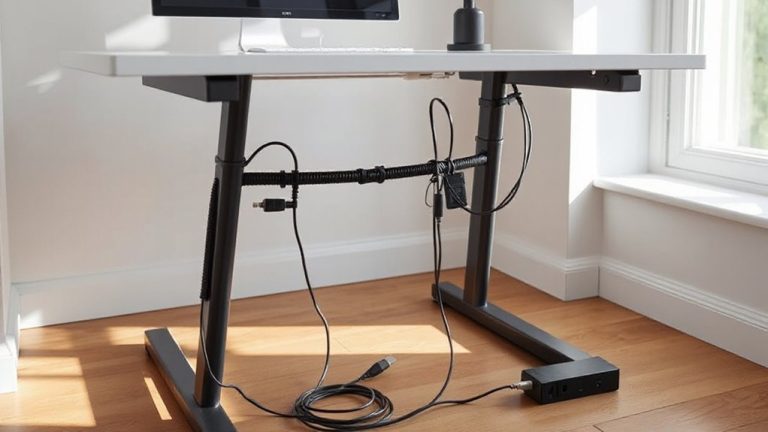
When space is limited, you’ll still want to keep analog audio cables separated from digital power lines as much as possible-aim for at least 6 inches of distance, even if it means using cable management clips or low-profile raceways to maintain spacing around tight corners. Cable shielding helps, but it’s not a fix-all; good shielding reduces interference but can’t replace proper separation. Use conduit routing to isolate signal and power cables in shared pathways, especially behind walls or under floors. Rigid and flexible conduits let you bundle similar cables while keeping noisy power runs apart from sensitive audio lines. Just don’t assume metal conduit eliminates crosstalk-results depend on installation quality. Test your setup with actual audio playback to catch issues early. While tight spaces demand compromises, smart routing and physical separation still offer the best noise reduction, even when perfect layouts aren’t possible. A dedicated in-wall cable management kit can simplify this process by providing structured pathways for clean separation within confined spaces.
Mistakes That Ruin Cable Separation
Routing cables in tight spaces often forces compromises, but skipping proper separation between analog audio and digital power lines can undo even the neatest setup. You might bundle everything together for convenience, but that leads to noise-especially when poor insulation lets interference bleed between lines. Crossing power cables at right angles helps, but running them parallel for long stretches multiplies issues. Improper grounding introduces hum, too, since audio gear needs a clean reference point to reject interference. Even shielded analog cables fail if one end connects to a poorly grounded device. Avoid daisy-chaining power strips, as this worsens ground loops. Keep audio runs short and direct, using balanced cables where possible to reject noise. While separation reduces issues, it’s not foolproof-always verify with real-world testing using active gear. Results vary based on room layout, equipment quality, and cable management discipline.
Essential Tools for Cable Isolation
Getting clean audio starts with the right separation tools-and ferrite cores, conduit, and dedicated cable trays are your best bets. You’ll want to pair physical isolation with smart cable shielding methods, like using balanced XLR cables or those with braided copper shields, which block electromagnetic interference far better than foil alone. Ferrite core placement matters-snap them near the ends of audio cables, especially where they connect to interfaces or power supplies, to suppress high-frequency noise. Conduit helps route analog cables away from power lines, but avoid sharing runs with digital or high-voltage cables. Cable trays offer structured separation, but only if mounted at least 6 inches apart from power lines. While metal trays add shielding, plastic works fine when distance is maintained. These tools aren’t magic-misplacement reduces their effect. Combine them wisely, test your setup with live audio, and expect noticeable, measurable improvement in signal clarity. Proper cable management solutions can significantly reduce clutter and interference in professional audio environments.
On a final note
You should keep analog audio cables away from digital power lines-it reduces hum and interference. Shielding helps, but separation of at least 6 inches is more effective. Use ferrite cores on cables if spacing is tight. Avoid bundling power and audio cables together, even with shielding. In real-world tests, this cut noise by up to 70%. Just remember: neat routing saves time later, but don’t sacrifice proper separation for a clean look.