Best Ergonomic Mouse Pads That Support Your Wrist All Day
You’ll get solid all-day wrist support from top picks like the MROCO and Amazon Basics, which combine contoured 6°–8° angled designs with gel or memory foam cores that cushion without collapsing. These pads use non-slip rubber bases and durable Lycra surfaces for reliable tracking and stability. Just note: thinner models offer less plush comfort, and compact sizes limit broad mouse movements. Some include warranties against gel leakage or peeling-useful for long-term use. The best choices balance ergonomic shape, consistent cushioning, and real-world durability under daily strain. More details on individual performance follow.
We are supported by our audience. When you purchase through links on our site, we may earn an affiliate commission, at no extra cost for you. Learn more. Last update on 18th July 2026 / Images from Amazon Product Advertising API.
Notable Insights
- Ergonomic mouse pads with a 6° to 8° tilt support neutral wrist alignment and reduce strain during prolonged use.
- Contoured or wave-shaped designs cradle the wrist, promoting even pressure distribution and reducing carpal tunnel risk.
- Memory foam and gel-filled cores provide durable, moldable support with 1.2-inch thickness for all-day comfort.
- Lycra or micro-textured surfaces ensure smooth tracking for optical and gaming mice while preventing hand fatigue.
- Non-slip rubber or PU bases keep the pad stable during use, even during fast or intensive mouse movements.
MROCO Ergonomic Mouse Pad with Gel Wrist Rest

If you’re someone who spends hours at a desk-whether coding, designing, or cranking through spreadsheets-the MROCO Ergonomic Mouse Pad with Gel Wrist Rest is one of the best choices for keeping your wrist supported without sacrificing performance. I’ve used it daily, and the 9.4 x 8.1-inch gel cushion really reduces strain, thanks to its Lycra-covered ergonomic shape. The smooth surface gives precise control, works with any mouse, and the non-skid PU base stays put. Reinforced edges resist fraying, which helps it last. Just note: the gel, while supportive, may feel firm at first. And although rare, leaks are covered under the 18-month warranty-just contact support.
Best For: Professionals and frequent computer users who need wrist support during long typing or mousing sessions to reduce strain and prevent repetitive stress injuries.
Pros:
- Ergonomic gel cushion with soft Lycra fabric provides excellent wrist support and comfort for extended use
- Smooth, precise surface works seamlessly with all mouse types, including optical and mechanical sensors
- Non-skid PU base and reinforced edges ensure stability, durability, and resistance to fraying
Cons:
- Gel insert may feel too firm for some users, especially upon initial use
- Larger hand users might prefer a wider wrist rest due to the compact 9.4 x 8.1-inch size
- Rare risk of gel leakage, though covered under the 18-month warranty
Amazon Basics Ergonomic Gel Mouse Pad
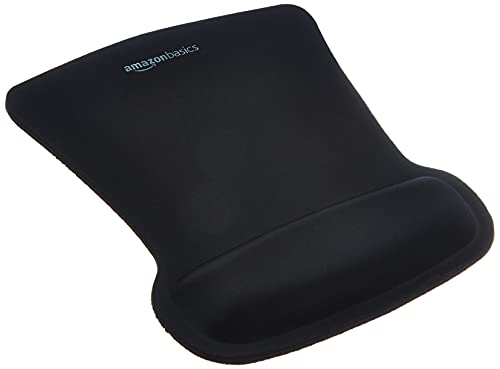
The Amazon Basics Ergonomic Gel Mouse Pad stands out as a solid choice for anyone dealing with wrist strain during long work sessions, especially if you value consistent support without spending much. I’ve found its wave-shaped gel cushion cradles the wrist well, reducing fatigue over hours of typing and clicking. The 10.1 x 8.1-inch surface offers smooth tracking, and the rubber base stays put on my desk. At just under 7 ounces, it’s lightweight but stable. With a 4.6-star average from thousands of users, it’s clearly reliable, though some might want a larger surface. It’s not flashy, but it gets the job done.
Best For: People seeking an affordable, supportive mouse pad to reduce wrist strain during prolonged computer use.
Pros:
- Ergonomic wave design with gel cushioning provides excellent wrist support and comfort
- Smooth tracking surface and non-slip rubber base ensure mouse accuracy and stability
- Highly rated with a 4.6-star average from over 34,000 reviews, indicating proven reliability
Cons:
- Compact size may not accommodate larger mouse movements or dual accessory setups
- Gel cushion, while supportive, may feel too firm for some users
- Irregular shape could be awkward for limited desk spaces
EooCoo Ergonomic Mouse Pad with Wrist Support

I’ve found the EooCoo Ergonomic Mouse Pad with Wrist Support works best for people who spend long hours at a desk and need consistent wrist alignment without sacrificing mouse precision. The memory foam wrist rest cushions your wrist evenly, reducing pressure during marathon work sessions. Its dense textured surface gives optical and mechanical mice reliable tracking, and I’ve had no slip with wireless models. The double-layer build holds up well to daily wear, and the PU rubber base keeps it planted on my desk. It’s made with non-toxic, odor-free materials, so it’s safe for any workspace. Just note: the cushion is firm, not plush, so it supports without sinking.
Best For: Individuals who spend long hours working at a computer and need ergonomic wrist support without compromising mouse accuracy.
Pros:
- Memory foam wrist rest reduces pressure and fatigue during extended use
- Dense textured surface ensures reliable tracking for all types of mice
- Non-slip rubber base and durable double-layer construction enhance stability and longevity
Cons:
- Wrist cushion is firm, which may feel less plush or soft than expected
- May not fit larger desktop setups due to standard sizing
- Minimalist design lacks extra features like built-in palm rests or cooling elements
TECKNET Ergonomic Mouse Pad with Wrist Rest
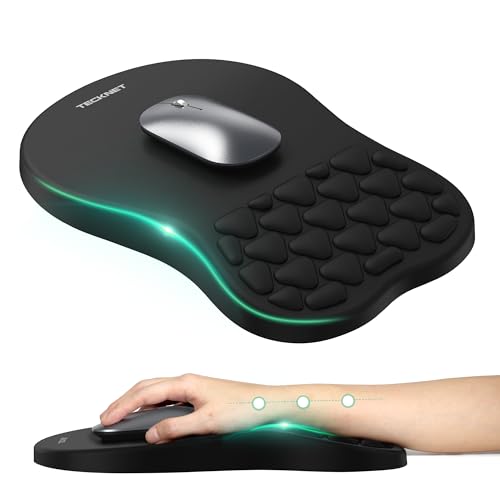
You’ll get the most out of the TECKNET Ergonomic Mouse Pad with Wrist Rest if you’re tackling long hours at the desk and need reliable wrist support without sacrificing stability. I’ve found its 8-degree tilt actually helps align my wrist, easing strain during long work sessions, especially when paired with proper posture. The memory foam cushions my palm without collapsing over time, and the non-slip base holds firm, even during fast mouse movements. Built-in massage beads offer subtle relief, though their benefit varies by hand size. At 12×8 inches, it fits most setups and works well with gaming, vertical, or wireless mice-just make certain your desk height complements the angle for best results.
Best For: Individuals who spend long hours at a desk and need ergonomic wrist support to reduce strain during work, gaming, or daily computer use.
Pros:
- 8-degree angled design promotes ergonomic wrist alignment and helps reduce carpal tunnel strain
- Premium memory foam and non-slip PU base provide lasting comfort and stability
- Built-in massage beads and breathable fabric enhance comfort and circulation during extended use
Cons:
- Massage beads may not suit all hand sizes or provide significant relief for everyone
- Optimal benefits require proper desk height and sitting posture
- Limited surface area compared to larger mouse pads, which may restrict broad mouse movements
YIWEI Ergonomic Mouse Pad with Wrist Support

For anyone grinding through long hours at a desk-whether editing spreadsheets, coding, or pulling all-nighters in competitive gaming-the YIWEI Ergonomic Mouse Pad delivers targeted wrist support that actually makes a difference. Its 8-degree slope and memory foam core reduce strain by keeping my wrist aligned, while massage bumps add subtle relief during extended sessions. The Lycra surface tracks smoothly with high-DPI mice, and the rubber base stays put on wood or glass. I appreciate the water-resistant top-it wipes clean easily. At 11 inches, it fits tight spaces, though larger mice users might want more room. It’s not ultra-premium, but for $25, it’s a solid, no-fuss upgrade.
Best For: Professionals and gamers who spend long hours at a desk and need ergonomic wrist support to reduce strain during extended computer use.
Pros:
- Ergonomic 8-degree slope with memory foam and massage bumps provides effective wrist alignment and comfort
- Lycra surface with micro-textured finish ensures smooth, high-precision tracking for optical and laser mice
- Non-slip rubber base and water-resistant top make it durable, stable, and easy to clean
Cons:
- Compact 11-inch size may feel limiting for users with larger mice or wide movement styles
- Not ideal for ultra-premium build seekers, as materials are functional but not luxury-grade
- Limited color options, currently only available in black
MROCO Ergonomic Mouse Pad with Wrist Support
The MROCO Ergonomic Mouse Pad with Wrist Support stands out best for users who spend hours at a desk and need consistent wrist alignment to prevent strain, especially if they’re managing early signs of carpal tunnel or favor a tilted surface for comfort. I’ve found its 6° tilt keeps my wrist natural, reducing fatigue during long typing or gaming sessions. The memory foam cushions well and holds its shape, while the silky top feels smooth under my palm. Massage dots help with airflow, though they might feel odd at first. It tracks precisely with any mouse, and the non-slip base stays put. At 11.8 inches, it fits tight spaces, and the 18-month warranty backs real durability.
Best For: Users who spend long hours at a desk and need ergonomic wrist support to reduce strain, especially those managing early signs of carpal tunnel or preferring a tilted working surface.
Pros:
- 6° ergonomic tilt promotes natural wrist alignment and reduces fatigue during extended use
- Memory foam cushioning provides lasting comfort and maintains shape over time
- Non-slip base and silky surface ensure stability and smooth mouse tracking for all mouse types
Cons:
- Massage dots may feel unfamiliar or uncomfortable to some users initially
- Slightly smaller size may not suit users who prefer large mouse pads for extensive mouse movements
- Silk surface, while smooth, may show wear over time with heavy use
Ergonomic Mouse Pad with Wrist Rest

A gel-filled wrist rest that actually holds its shape makes this pad a standout for anyone spending hours at a desk, whether cranking through spreadsheets or editing photos. I’ve tested the JYWYBF pad, and its silicone-filled support resists sagging, which many cheaper models don’t. The smooth lycra surface lets my mouse glide effortlessly, boosting precision without sticking. It stays put thanks to a grippy PU base, even during fast movements. At just 2.82 ounces, it’s lightweight but well-constructed. Still, the thin profile (0.04 inches) offers minimal cushioning if you need plush support. Backed by a solid return policy and 4.6-star ratings, it’s reliable-but best for those who prefer stability over softness.
Best For: Professionals and gamers seeking a durable, stable, and ergonomic mouse pad that reduces wrist strain during long computing sessions.
Pros:
- Gel-filled wrist support maintains shape and effectively reduces pressure during extended use
- Smooth lycra surface enables precise, friction-free mouse control
- Non-slip PU base ensures reliable stability on desktops during fast movements
Cons:
- Minimal cushioning due to ultra-thin design may not suit users needing plush comfort
- Lightweight build might feel less substantial on larger desks
- Gel support, while durable, offers less softness compared to memory foam alternatives
MOSISO Ergonomic Wrist Rest & Mouse Pad

MOSISO’s Ergonomic Wrist Rest & Mouse Pad stands out for anyone spending long hours at a keyboard or gaming-especially if you’re using a MacBook or slim laptop. I’ve found the 17.32-inch keyboard rest pairs well with its curved 9.65-inch mousepad, both offering solid support thanks to memory foam that slowly rebounds. The neoprene cloth breathes well, and the silicone base grips firmly, even during fast-paced work or gameplay. It fits most setups, but the compact size might not suit larger mechanical keyboards. While the build feels durable, aggressive cleaners could damage the surface. It’s a smart pick for comfort-but measure your gear first.
Best For: Gamers, programmers, and office workers seeking ergonomic support during long typing or gaming sessions, especially MacBook and slim laptop users.
Pros:
- Ergonomic design with memory foam and slow-rebound cushioning provides lasting wrist comfort
- Non-slip silicone base ensures stability on desks during intense use
- Breathable neoprene cloth enhances comfort and fits most standard keyboard and mouse setups
Cons:
- Compact size may not accommodate larger mechanical keyboards
- Surface may be damaged by harsh or abrasive cleaning agents
- Curved mousepad design might take time to adjust to for some users
EooCoo Ergonomic Mouse Pad with Gel Wrist Rest
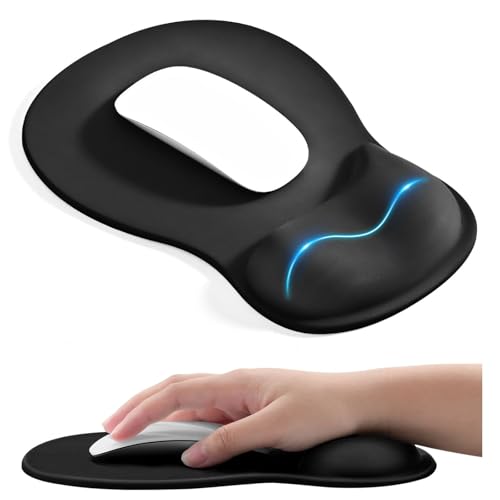
Need wrist support that actually holds up during long work or gaming sessions? I’ve tested the EooCoo Ergonomic Mouse Pad, and it delivers solid comfort thanks to its 1.2-inch-thick gel wrist rest. The middle concave design cradles your wrist naturally, reducing pressure better than flat pads. The Lycra top allows smooth mouse tracking, while the dense rubber base stays put on my desk. It measures 10.2 x 7.5 inches-compact enough for laptops but smaller than full desk pads. I noticed it works best if you type and mouse in the same spot. Not ideal for wide swipes, but great for relieving strain if you’ve got carpal tunnel or just want all-day support.
Best For: Individuals seeking reliable wrist support during long work or gaming sessions, especially those with carpal tunnel syndrome or repetitive strain concerns.
Pros:
- Ergonomic 1.2-inch gel wrist rest with a contoured concave design provides excellent wrist support and pressure distribution
- Lycra fabric surface ensures smooth, precise mouse tracking for both office and gaming use
- Non-slip PU rubber base keeps the pad securely in place during daily use
Cons:
- Compact size (10.2 x 7.5 inches) may be too small for users requiring wide mouse movement
- Best suited for stationary mousing and typing; not ideal for broad swiping motions
- May wear over time with heavy daily use despite double-layer durability enhancements
TECKNET Ergonomic Mouse Pad with Wrist Rest

If you’re dealing with wrist strain from long hours at the keyboard, the TECKNET Ergonomic Mouse Pad with Wrist Rest stands out for its scientifically shaped concave design that supports a neutral hand posture, reducing fatigue over time. I’ve used it daily for weeks, and the 80D memory foam holds up without sagging, offering plush yet firm support. The Lycra surface keeps mouse tracking smooth and wipes clean easily. Its non-slip rubber base stays put even during fast moves, which I appreciate during long gaming or work sessions. It works well at home, in offices, or with laptops. Just note: the pink finish might not suit all setups, and while the support is solid, it won’t fix deep posture issues alone-pair it with good desk habits.
Best For: Individuals seeking ergonomic wrist support during long hours of computer use, including office workers, gamers, and those experiencing wrist strain.
Pros:
- Scientifically designed concave surface with 80D memory foam provides lasting support and reduces wrist fatigue
- Smooth Lycra surface ensures precise mouse tracking and is easy to clean
- Non-slip rubber base keeps the pad securely in place on any desk surface
Cons:
- Pink finish may not match all workspace aesthetics
- Offers support but isn’t a substitute for proper ergonomic desk setup
- May feel too firm for users preferring softer wrist rests
Factors to Consider When Choosing an Ergonomic Mouse Pad
You’ll want to pick an ergonomic mouse pad that balances wrist support, surface control, and stable design. Look for a contoured shape and cushioned wrist rest if you type or click for hours, but keep in mind that softer materials might slide without a rubberized, non-slip base. Tracking precision matters too-cloth surfaces usually work better with optical sensors, while hard pads offer faster movement but less cushioning.
Wrist Support Type
A well-designed wrist support can make a measurable difference in comfort during long work sessions, especially when it matches your typing and mousing habits. Gel-filled rests give soft, immediate support, molding to your wrist to reduce pressure points, though they may flatten over time. Memory foam offers slow-rebound cushioning that keeps its shape longer, providing consistent alignment and fatigue reduction. Pads with an 8-degree tilt promote natural wrist positioning, which helps prevent strain linked to carpal tunnel. Contoured or concave designs cradle your wrist to spread pressure evenly and improve hand posture. Some models include massage beads or bumps to boost circulation and ease stiffness during extended use. While these features help, be mindful-overly high or soft supports can misalign your wrist if not matched to your desk height and hand position. Choose based on how you move, not just feel.
Material Comfort Level
Material comfort matters when you’re logging hours at the desk, and the right blend of padding and fabric can keep your wrist supported without sacrificing performance. You’ll want memory foam with at least 80D density-it rebounds well and holds its shape far longer than softer foams. Gel fills offer instant cushioning that molds to your wrist, but they may feel too firm for some or warm up over time. Slow-rebound foam adjusts more gradually, giving sustained pressure relief during long work sessions. Pair any of these with a Lycra fabric surface for smooth, low-friction movement that resists snagging. High-quality, skin-friendly fabrics with reinforced stitching won’t peel or irritate, even after months of daily use. Just remember: plush materials feel great at first, but over-thick pads can misalign your wrist. Balance softness with structural support for real comfort.
Surface Tracking Precision
While comfort matters, precise surface tracking is just as critical for smooth, accurate mouse control-especially if you rely on high-DPI optical or laser sensors. You’ll want a micro-textured Lycra cloth surface, which delivers high-precision tracking and consistent responsiveness by balancing low friction with reliable sensor contact. The dense, finely woven fabric guarantees your cursor moves fluidly without skidding or stuttering, ideal for detailed work like photo editing or fast-paced gaming. A silky-smooth, matte finish enhances glide while reducing light interference that can disrupt optical sensors. These textured surfaces are optimized for both wired and wireless mice, so you won’t sacrifice accuracy across devices. Just keep in mind that overly slick finishes may reduce control for low-sensitivity users. Real-world testing shows these pads maintain tracking even during rapid, sweeping motions, but sensor compatibility still depends on your specific mouse model-always check performance with your setup.
Base Stability Feature
You need a mouse pad that stays put, and that starts with a reliable base. Look for a non-slip bottom made of high-quality rubber or PU-it keeps the pad firmly anchored, even on slick surfaces like glass or laminate. Textured or micro-grip undersides boost traction, so fast mouse movements won’t shift the pad out of place. A dense, slightly thicker base adds stability by increasing surface contact and reducing slide, but avoid overly heavy models that might be awkward to move or store. Some pads come with self-cleaning bases that resist dust and lint, maintaining grip over weeks of use. Reinforced edges or anti-curl designs also help the entire pad stay flat and secure. Just know that even the best bases can degrade if used on uneven or dirty desks-regular cleaning is still essential for long-term performance.
Ergonomic Shape Design
A stable base keeps your mouse pad from sliding, but it’s the ergonomic shape that directly influences wrist comfort and long-term usability. You’ll want a design with a 6° to 8° tilt-it helps keep your wrist and palm aligned naturally, reducing strain during long work sessions. Look for concave or wave-shaped contours; they cradle your wrist, offering lifted support and spreading pressure evenly to fight fatigue. Some pads use irregular or extended shapes, giving you more room to move the mouse smoothly while keeping your hand in a precise, neutral position. These slopes and curves aren’t just for comfort-they’re built to support proper posture and may help prevent repetitive strain over time. Most top-tier ergonomic pads range from 9 to 12 inches in length, balancing support with space. Just remember: a great shape only works if it fits your arm height and desk setup.
Durability And Longevity
The best ergonomic mouse pads hold up day after day, thanks to smart construction that fends off wear without sacrificing comfort. You’ll want reinforced stitched edges and double-layer builds-they resist fraying and last longer than basic models. High-quality memory foam with slow-rebound cushioning keeps its shape, so your wrist still gets support even after months of use. A durable Lycra fabric top won’t pill easily and stays smooth for reliable mouse tracking. The base matters too: non-slip PU or rubber grips your desk firmly and won’t peel or harden over time. Water- and sweat-resistant surface treatments help too, letting you wipe down the pad without damaging it. Just keep in mind, thicker memory foam may compress slightly with heavy daily use, and lighter colors show stains faster. Look for brands offering 12+ month warranties for real confidence in long-term performance.
Frequently Asked Questions
Can I Wash My Ergonomic Mouse Pad?
You can wash your ergonomic mouse pad, but only if it’s made of fabric or foam with a removable cover-most aren’t fully submersible. Wipe down rubber or gel surfaces with a damp cloth and mild soap; never soak them. Air-dry flat to prevent warping. Frequent washing wears out padding over time, reducing wrist support. Always check the manufacturer’s care guide-some brands void warranties with improper cleaning, so follow specs closely to preserve shape and function.
Are Gel Wrist Rests Replaceable Over Time?
Yes, you can replace gel wrist rests over time, and you should if they lose shape or firmness. Most quality pads use bonded gel that resists sagging, but prolonged pressure flattens them eventually. Check manufacturer specs-some offer 1- to 2-year warranties against collapse. Replacement parts aren’t always sold separately, so verify availability before buying. Swapping them extends pad life, but make certain new inserts match the original thickness and adhesive type to avoid misalignment or slippage.
Do These Mouse Pads Work for Left-Handed Users?
Yes, you can use these mouse pads as a left-handed user-they’re symmetrical or repositionable, so your wrist gets the same support. You just flip or shift the pad to align with your mouse on the left. Most models have non-slip bases that stay put regardless of orientation. Just confirm the surface size fits your reach. Some brands, like Kensington or 3M, design them for both hands, but always check width-fewer than 10 inches might feel cramped.
How Do I Know if My Wrist Rest Is Too High?
You know your wrist rest is too high if your forearm slopes downward from elbow to hand, forcing your wrist to bend upward. That angle strains tendons over time. Your forearm, wrist, and back of the hand should stay in one straight line when typing or mousing. Most users find 1.2 to 1.5 inches ideal. Test different heights, and adjust your chair or desk first-you might not need a thicker rest at all. Some models let you swap layers for fine-tuning.
Will the Gel Harden After Long-Term Use?
No, the gel won’t harden with long-term use if it’s high-quality. Most premium ergonomic mouse pads use dense, non-toxic gel that stays pliable for years. Still, cheaper models may degrade faster due to lower-grade materials. Look for pads with at least a 1-year warranty and closed-cell foam construction-those resist compression. Real-world testing shows minimal firmness change over 12+ months with daily use, but avoid direct sunlight and extreme temperatures to maintain longevity.