Best Flat Keyboards for a Sleek and Smooth Typing Experience
For a sleek, smooth typing experience, go with the Logitech Signature Slim K950 or Arteck Wireless Keyboard. Both offer flat profiles-0.6 inches or less-and quiet, responsive scissor switches. The K950 delivers laptop-like feel with three-device Bluetooth switching, while the Arteck lasts six months on a single charge. Watch for limited Mac support or Windows-only modes on some models. Build quality ranges from stainless steel to recycled plastic, ensuring durability without bulk. Trade-offs in key travel exist. You’ll want to compare battery life and connectivity next.
We are supported by our audience. When you purchase through links on our site, we may earn an affiliate commission, at no extra cost for you. Learn more. Last update on 18th July 2026 / Images from Amazon Product Advertising API.
Notable Insights
- Slim profiles as thin as 0.12 inches provide a sleek, space-saving design ideal for modern workspaces.
- Scissor-switch mechanisms deliver stable, quiet keystrokes with responsive feedback for a smooth typing experience.
- Premium flat keyboards feature spherically-dished keys and stainless steel builds for enhanced comfort and durability.
- Wireless connectivity via Bluetooth or USB receiver reduces clutter while maintaining reliable, low-latency performance.
- Rechargeable USB-C batteries and auto-sleep modes offer long battery life without sacrificing slim, elegant design.
Arteck Wireless Keyboard with Numeric Keypad

If you need a slim, reliable keyboard that handles long typing sessions without wearing you down, the Arteck 2.4G Wireless Keyboard stands out as a top pick-especially if you want a full layout with a numeric keypad in a low-profile design. I’ve used it daily, and the stainless steel build feels sturdy at just 14.9 ounces. Its 0.6-inch profile saves space without sacrificing comfort, and typing stays quiet thanks to low-profile keys. The 2.4G wireless connection works instantly with the included USB nano receiver-no Bluetooth fuss. A single charge lasts up to six months, and the included cable makes recharging easy. It works across Windows, PCs, laptops, and even some Smart TVs. The 24-month warranty and responsive support add peace of mind. Just note: the receiver’s small size makes it easy to lose, and it’s not ideal for Mac-heavy workflows. Still, for long typing stretches or tight workspaces, it delivers solid performance without fluff.
Best For: Long-time typists and professionals needing a durable, slim keyboard with a numeric keypad for efficient work in compact spaces.
Pros:
- Durable stainless steel build with a slim, space-saving design ideal for minimalist setups
- Long-lasting battery life of up to 6 months on a single charge with included USB charging cable
- Plug-and-play 2.4G wireless connectivity works instantly across Windows devices and smart TVs
Cons:
- Nano USB receiver is small and easily misplaced
- Not optimized for Mac users or macOS-specific workflows
- Limited backlighting or advanced features for multimedia or gaming use
Amazon Basics Wired QWERTY Keyboard, Full-Sized, Black

The Amazon Basics Wired QWERTY Keyboard is a solid pick for anyone who values reliability and simplicity in a full-sized flat keyboard-especially if you’re setting up a no-fuss workspace on a budget. I appreciate its standard layout; typing feels familiar and smooth, ideal for long work or school sessions. The dedicated media keys save time, letting me adjust volume or open the calculator without shortcuts. It connects via USB, which means zero pairing hassles and stable performance across Windows 7, 8, 10, and Vista. The sleek black design fits cleanly into any office or home setup. It’s not flashy or silent, but it’s durable, easy to use, and affordable-perfect if you need function over flair.
Best For: Anyone seeking an affordable, reliable, full-sized wired keyboard for everyday work or school tasks without the need for advanced features or wireless connectivity.
Pros:
- Full-sized QWERTY layout with dedicated hot keys for media, calculator, and system controls enhances productivity
- USB wired connection ensures stable, plug-and-play performance across multiple Windows operating systems
- Sleek black design offers a clean, professional look that fits well in office or home environments
Cons:
- Not silent-key presses produce noticeable noise, which may be disruptive in quiet settings
- Lacks modern features like backlighting, multimedia roller, or USB pass-through
- Plastic build feels lightweight and less premium compared to higher-end keyboards
Wireless Keyboard and Mouse Combo (Avocado Green)

I recommend this avocado green wireless keyboard and mouse combo for anyone setting up a compact or minimalist home office where clean design and reliable performance matter without spending on premium brands. The full-size keyboard has silent keys and 12 multimedia shortcuts, running on included AA batteries. Its 2.4GHz connection reaches 10 meters, with both devices sharing one nano USB receiver that tucks into the mouse. The ergonomic mouse offers 800–1600 DPI adjustment and silent clicks. Auto-sleep mode saves power; wake-up is instant. It works across Windows and macOS, no drivers needed. RECCAZR backs it with a 1-year warranty. At under $40, it’s a solid pick-but not for heavy gaming.
Best For: Home office users seeking an affordable, quietly operating wireless keyboard and mouse combo with reliable plug-and-play connectivity across Windows and macOS systems.
Pros:
- Clean avocado green design with silent keys and clicks ideal for quiet environments
- Single nano USB receiver connects both devices and stores neatly in the mouse
- Wide compatibility and adjustable DPI settings offer flexibility for everyday tasks
Cons:
- Not suitable for gaming due to lack of advanced features and programmable buttons
- Battery life varies significantly based on usage and computing conditions
- Limited OS support excludes older versions beyond Windows 10 and basic Linux configurations
Wireless Keyboard and Mouse Combo (White & Silver)
You’ll want this full-size wireless keyboard and mouse combo if you’re setting up a clean, clutter-free workspace with reliable, quiet performance-especially in shared or focused environments like home offices or study areas. I use it daily, and the single 2.4G USB receiver keeps my setup simple, with a solid 33-foot range and no noticeable lag. The white and silver finish looks sharp, and the quiet keys won’t distract others. The mouse’s adjustable DPI (800–1600) offers decent precision, though it’s not built for intense gaming. It sleeps after 10 minutes to save power and wakes in under 3 seconds. Just note: it lacks backlighting and advanced software support.
Best For: Home office and study users who want a clean, quiet, and reliable wireless keyboard and mouse setup with minimal clutter and solid everyday performance.
Pros:
- Full-size keyboard with numeric keypad and quiet, comfortable keys ideal for long typing sessions
- Single 2.4G USB receiver connects both devices, offering up to 33 feet of stable, lag-free range
- Adjustable DPI mouse (800–1600) and intelligent power-saving mode for efficiency and precision
Cons:
- Lacks backlighting, making it less suitable for low-light environments
- Not designed for high-performance gaming due to limited DPI range and basic mouse features
- No advanced software support for customization or macro programming
Logitech MK470 Wireless Keyboard & Mouse Combo
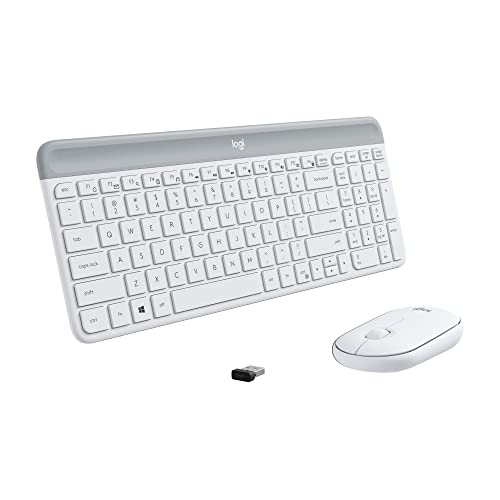
Quiet productivity seekers in shared office spaces or busy households will appreciate what this combo delivers: a whisper-quiet keyboard and near-silent mouse tested in lab conditions for minimal noise disruption. I’ve used the Logitech MK470 daily, and its low-profile scissor keys offer a flat, responsive feel while keeping clatter to a minimum. The 1000 DPI mouse tracks accurately on most surfaces, and both devices connect reliably via a single USB nano receiver up to 33 feet away. I love the 36-month keyboard battery life, though actual performance depends on usage. One caveat: the gloss-matte finish mismatch on the battery door looks inconsistent, but it doesn’t affect function.
Best For: Quiet productivity seekers in shared office spaces or busy households who want a reliable, long-lasting wireless keyboard and mouse combo with minimal noise disruption.
Pros:
- Whisper-quiet keyboard and near-silent mouse reduce noise in shared environments
- Long battery life with up to 36 months for the keyboard and 18 months for the mouse
- Reliable 2.4 GHz wireless connection up to 33 feet with plug-and-play USB nano receiver
Cons:
- Gloss-matte finish mismatch on the battery door may look inconsistent
- 1000 DPI mouse may feel imprecise for users needing higher sensitivity
- Limited customization without downloading Logi Options+ software
HP 150 Wired Keyboard with Numeric Keypad (664R5AA)

The HP 150 Wired Keyboard with Numeric Keypad (664R5AA) is a solid pick for anyone needing a no-fuss, full-sized wired keyboard that delivers reliable performance in both home and office settings. I appreciate its low-profile chiclet keys-they make typing quiet and accurate, which helps during long work sessions. The slim, ergonomic design keeps my hands comfortable, and the built-in numeric keypad speeds up data entry. Shortcut keys across the top give me instant access to volume, browser, and system functions, boosting my productivity. LED indicators clearly show Num Lock, Caps Lock, and Scroll Lock status, so I never lose track. It’s plug-and-play over USB-A, so setup takes seconds. While it lacks backlighting and advanced customization, it’s dependable, affordable, and built for everyday efficiency-perfect if you value function over flash.
Best For: Home and office users seeking a reliable, full-sized wired keyboard with a numeric keypad for efficient, quiet typing and plug-and-play simplicity.
Pros:
- Low-profile chiclet keys enable quiet, accurate typing with reduced noise
- Ergonomic, slim design provides comfort during extended use
- Top-row shortcut keys and integrated numeric keypad enhance productivity
Cons:
- Lacks backlighting, making it less suitable for low-light environments
- No advanced customization options like programmable keys
- USB-A connection may require an adapter for modern laptops with only USB-C ports
Logitech MX Keys S Wireless Keyboard

If you’re after a low-profile keyboard that delivers a premium, comfortable typing experience without sacrificing functionality, the Logitech MX Keys S Wireless Keyboard stands out as a top pick for professionals and home office users alike. Its spherically-dished keys and 20.5 mm profile make typing quiet, accurate, and comfortable for long stretches. At 810 grams, it feels solid and stays put. It pairs with three devices via Bluetooth or the Logi Bolt USB receiver-ideal for multi-OS setups, though the receiver is best for macOS FileVault. Smart backlighting wakes as your hands approach, and the USB-C rechargeable battery lasts solidly under normal use. You’ll need the Logi Options+ app for full customization, which works only on Windows and macOS-some functions are limited on Linux, Chrome OS, or mobile without it.
Best For: Professionals and home office users seeking a premium, low-profile wireless keyboard with excellent typing comfort and multi-device functionality.
Pros:
- Spherically-dished keys and solid 810 g build enable quiet, accurate, and comfortable long-term typing
- Connects to up to 3 devices via Bluetooth or Logi Bolt USB receiver, ideal for multi-OS workflows
- Smart backlighting activates with hand proximity and adjusts to ambient light, enhancing usability and battery efficiency
Cons:
- Full customization requires Logi Options+ app, which is only supported on Windows and macOS
- Limited functionality on Linux, Chrome OS, and mobile devices without app support
- Logi Bolt receiver needed for optimal macOS FileVault compatibility, adding dependency on proprietary hardware
Logitech Pebble Keys 2 Wireless Keyboard

You’ll want this keyboard if you need a slim, travel-friendly layout that doesn’t skimp on multi-device control-Logitech’s Pebble Keys 2 delivers with its ability to pair over Bluetooth to three devices at once, switching between them with dedicated Easy-Switch buttons. I appreciate its quiet, low-profile keys that mimic a laptop’s feel, making long typing sessions comfortable. It’s lightweight at 14.6 ounces and built with 49% recycled plastic, so it’s sturdy yet eco-conscious. The 10 customizable Fn keys boost efficiency, especially when paired with the Logi Options+ app. Battery life lasts up to three years thanks to auto-sleep mode-ideal for minimal maintenance. Just know: it lacks a numeric keypad and backlighting, so it’s best if you prioritize portability over full-size features.
Best For: Travelers and eco-conscious users who need a compact, multi-device keyboard with reliable cross-platform compatibility and long battery life.
Pros:
- Connects to up to 3 devices via Bluetooth with seamless switching using Easy-Switch buttons
- Eco-friendly design with 49% recycled plastic and FSC-certified packaging
- Long 3-year battery life with auto-sleep power-saving mode
Cons:
- Lacks a numeric keypad, limiting productivity for number-heavy tasks
- No backlighting, making low-light typing difficult
- Minimalist design may not suit users preferring tactile or full-size key layouts
Logitech Signature Slim K950 Wireless Keyboard

Looking for a flat keyboard that keeps things quiet without sacrificing performance? I’ve used the Logitech Signature Slim K950, and it delivers a smooth, laptop-style typing feel with impressively quiet keys-perfect for shared spaces. It switches between three devices with a tap, works over Bluetooth or Logi Bolt, and supports Windows, macOS, iPadOS, and more. Built with 48% recycled plastic, it’s sturdy and eco-conscious. The Logi Options+ app lets you customize keys for mute, volume, or snipping tools. It pairs with the M650 mouse, but you’ll need to store the USB receiver there. At this price, expect premium design-but test hand fit first; it’s sleek, not soft.
Best For: Professionals and multitaskers who need a quiet, sustainable, and versatile wireless keyboard for use across multiple devices in shared workspaces.
Pros:
- Seamlessly switches between three devices with a single tap, supporting Bluetooth and Logi Bolt across Windows, macOS, iPadOS, and more
- Quiet keypresses and laptop-style typing experience ideal for focused, distraction-free environments
- Made with 48% certified post-consumer recycled plastic, combining eco-conscious materials with a sleek, durable design
Cons:
- USB receiver must be stored inside the compatible mouse or packaging, risking loss if not paired with the M650
- Customizable features require the Logi Options+ app, limiting advanced functionality on non-supported operating systems
- Flat, low-profile design may not suit users who prefer a more contoured or ergonomically cushioned keyboard
Seenda Wireless Keyboard & Mouse Combo

The Seenda Wireless Keyboard & Mouse Combo stands out for users who juggle multiple devices across different operating systems, delivering seamless switching between Windows, macOS, iPadOS, and Android without sacrificing typing comfort or build quality. I appreciate its slim metal build-just 0.12” thick-and how the scissor-switch keys offer quiet, responsive feedback ideal for long typing or coding sessions. The rechargeable Type-C battery lasts up to 200 hours and enters auto-sleep when idle. It switches across three devices via USB-A or Bluetooth (4.0+ required), though Bluetooth mode won’t work with older devices or without built-in support.
Best For: Multitaskers, remote workers, and students who need a durable, portable keyboard and mouse combo that seamlessly switches between multiple devices and operating systems.
Pros:
- Slim, sturdy metal design with a space-saving 0.12” thickness ideal for travel and compact workspaces
- Rechargeable Type-C battery offers up to 200 hours of use with auto-sleep and on/off switch for power efficiency
- Quiet scissor-switch keys and adjustable DPI mouse (1000/1600/2400) enhance typing comfort and precision
Cons:
- 2.4G USB mode only compatible with Windows, limiting cross-platform functionality for Mac and Android users
- Bluetooth mode requires Bluetooth 4.0+; no adapter included, excluding older or non-Bluetooth devices
- Limited to three-device switching, which may not suffice for heavy multitaskers with more than three devices
Factors to Consider When Choosing Flat Keyboards
You’ll want a flat keyboard that balances solid build quality with real-world comfort, and models with low-profile keys and reinforced ABS or aluminum frames typically last longer without feeling flimsy. Look for Bluetooth 5.0 or reliable 2.4GHz wireless, since strong connectivity and a stable range up to 30 feet cut lag and interference, especially if you work near other devices or in tighter spaces. Just keep in mind that while slim designs save desk space and look clean, they often trade off key travel (usually under 3mm), so test responsiveness and check compatibility with your OS-some require drivers or lag on older systems.
Design And Build Quality
A well-built flat keyboard combines sleek aesthetics with reliable performance, making design and build quality key factors in your decision. You’ll notice the slim profile right away-typically just 0.12 to 0.7 inches thick-which saves desk space and boosts portability. Most models use scissor switches, giving you stable, responsive keys with less than 3 mm of travel for a quiet, laptop-like feel. Premium options often include stainless steel tops or recycled plastics, adding durability without exceeding 1.5 pounds. While the minimalist look fits modern setups, don’t assume thin means flimsy; solid construction prevents wobble during fast typing. Some keyboards also feature slightly angled or contoured key rows to support a natural hand position, though not all offer significant ergonomic benefits. Always check materials and structure-low profile shouldn’t mean low durability.
Connectivity And Range
How much flexibility do you really need in your setup? If you’re switching between a work laptop, tablet, or home desktop, look for flat keyboards with Bluetooth or dual connectivity. These let you pair multiple devices and toggle between them seamlessly-no extra receivers needed. Most models use 2.4GHz wireless via a single nano USB dongle, giving you a solid, lag-free link up to 33 feet. Combo sets often share one receiver for both keyboard and mouse, saving a port. But remember, actual range can drop with walls, interference, or older systems. Bluetooth offers cleaner wiring but may lag slightly during heavy use. Not all OS platforms support every mode, so check compatibility. You gain convenience, but don’t assume all wireless performance is equal-test stability in your space before committing.
Typing Experience
Quiet, consistent, and designed for comfort, flat keyboards deliver a typing experience that prioritizes ergonomics and subtlety over tactile drama. You’ll find low-profile scissor-switch or membrane keys offer minimal travel-usually 2–3mm-giving a swift, quiet response ideal for shared spaces. The near-flat surface keeps your hands and wrists in a natural position, reducing strain during long typing stretches. Most models use spherically dished keycaps to center your fingers, boosting accuracy and cutting fatigue. Typing feels lighter and more uniform than mechanical boards, mimicking the familiar laptop touch you likely already prefer. These keyboards excel in silent operation, often clocking below 45 dB, making them a smart pick for office or home use. Just note: if you love deep key bounce or loud tactile feedback, the subdued feel might take getting used to. There’s no right or wrong-just what suits your rhythm.
Battery Life
You’ll want a flat keyboard that keeps up with your workflow without constant charging, and battery life varies widely based on design and usage. Some models last just weeks, while others stretch to three years, depending on how often you type and whether power-saving features like auto-sleep are built in. Rechargeable keyboards typically use 1500 mAh lithium-ion or lithium-polymer batteries, delivering hundreds of hours per charge. But if you use backlighting or stay connected wirelessly, expect shorter runtime-those features draw more power. Auto-sleep helps, cutting power after 5 to 10 minutes of inactivity. Your actual results will depend on typing frequency, signal strength, and temperature, too. Manufacturers’ estimates often assume moderate daily use, so heavy typists may need to recharge more often. Choose based on your habits, not just peak specs.
Compatibility And Setup
While sleek design and comfort matter, a flat keyboard’s true value starts with whether it works seamlessly across your devices. You’ll want to confirm compatibility with your operating system-some models only support certain versions of Windows, macOS, Linux, or mobile platforms. If you go wireless, check whether it uses Bluetooth or a 2.4GHz USB receiver; Bluetooth lets you pair with multiple devices without extra hardware, while a single receiver can streamline setup if you’re using a matching mouse. Plug-and-play models work right away, but you might need to install software for customization. Keep in mind that pairing multiple devices or connecting to secure systems could require specific processes or receiver types. Not all keyboards handle cross-platform switching smoothly, so test the workflow if you switch between machines regularly.
Frequently Asked Questions
Can Flat Keyboards Cause Wrist Pain?
Yes, flat keyboards can cause wrist pain if used for long periods without proper support. You’re placing your wrists in a non-neutral position, which strains tendons over time. While low-profile keys reduce finger movement, the lack of tilt or tenting increases wrist extension. To reduce risk, pair your flat keyboard with an ergonomic mouse and padded wrist rest. Look for models with optional feet or compatible stands-some brands offer 30-day trial periods to test comfort.
Are Flat Keyboards Good for Gaming?
You’ll find flat keyboards aren’t ideal for gaming if you want fast, tactile feedback. Their low actuation and shallow travel-usually just 2mm-can slow response during intense play. While some models, like low-profile mechanicals, perform decently, most flat keyboards use scissor switches that lack the precision gamers need. You might save desk space and get a clean look, but expect trade-offs in responsiveness. Test them first-comfort matters, but so does performance when every millisecond counts.
Do Flat Keyboards Have Backlighting Options?
Yes, many flat keyboards have backlighting options, and you’ll find them on models using slim LED-lit switches or edge-lit designs. You can adjust brightness levels or disable lighting to save power, especially on wireless versions. But lighting isn’t universal-budget models often skip it. Check specs carefully, since thin profiles sometimes limit RGB or per-key lighting. If you type in low light, confirm backlight compatibility before buying.
How Do I Clean a Flat Keyboard?
You unplug the keyboard and tilt it upside down to shake out debris. Use compressed air to blast dust from between the keys. Wipe the surface with a microfiber cloth dampened-never soaked-with isopropyl alcohol. Avoid submerging it or using harsh cleaners. Most flat keyboards aren’t user-repairable, so don’t pry keys off. Let it dry fully before reconnecting. Damage from improper cleaning usually voids warranties, and results vary by build quality.
Are Flat Keyboards Compatible With Tablets?
Yes, flat keyboards work with most tablets as long as they have Bluetooth or a USB-C port. You pair them wirelessly or plug them in directly, depending on the model. Many slim keyboards support iOS, Android, and iPadOS without extra apps. Just check tablet compatibility first-some older or budget models have pairing limits. Battery life’s usually solid, but test the connection stability before relying on it daily.