Best Printer Ink That Won’t Break the Bank
You’ll save without sacrificing reliability by choosing high-yield cartridges like the HP 67XL, which delivers 240 pages with smudge-resistant quality, or the E-Z Ink Compatible Canon XXL pack offering up to 6,360 pages and a 24-month warranty. While third-party inks cut costs, they risk printhead damage over time. Genuine HP and Canon cartridges last longer and maintain print head safety, especially under heavy use-ideal if you value consistency and long-term performance. There’s more to contemplate based on your printer model and print habits.
We are supported by our audience. When you purchase through links on our site, we may earn an affiliate commission, at no extra cost for you. Learn more. Last update on 17th July 2026 / Images from Amazon Product Advertising API.
Notable Insights
- High-yield ink cartridges, like HP 67XL, offer lower cost per page despite higher upfront cost.
- Third-party inks can save money but risk print head damage and inconsistent quality.
- HP Instant Ink reduces costs by automatically shipping cartridges based on actual usage.
- Cartridges made with recycled ocean-bound plastic, such as HP 62 and 67, combine affordability and sustainability.
- Real-world page yields drop significantly with dense printing; choose XL cartridges for high-coverage needs.
HP 67 Black Ink Cartridge (3YM56AN)
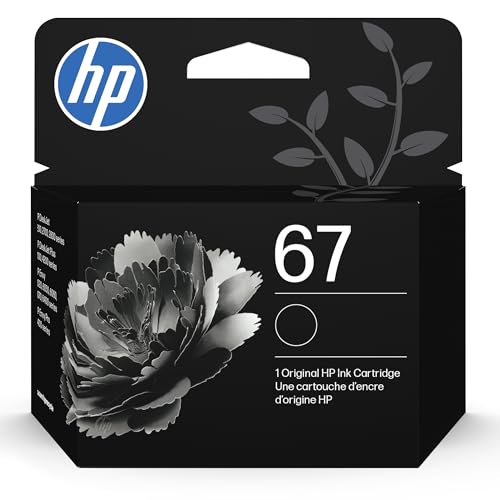
If you own an HP DeskJet or ENVY printer from the 1200, 2700, 4100, or 6000 series, the HP 67 Black Ink Cartridge (3YM56AN) is the best choice for reliable, no-fuss printing-think of it as the steady workhorse your home office can count on. I’ve used it across multiple devices, and it consistently delivers sharp text and smudge-free output. It yields about 120 pages, which isn’t huge but works for light to moderate printing. It’s engineered specifically for these models, so you avoid compatibility issues. Just know it’s not refillable and costs more per page than third-party options. If you value reliability over savings, and you’re in the HP ecosystem, this cartridge won’t let you down.
Best For: Home and small office users with HP DeskJet or ENVY printers from the 1200, 2700, 4100, or 6000 series who prioritize reliable, consistent printing over cost savings.
Pros:
- Designed specifically for seamless compatibility with HP DeskJet and ENVY series printers
- Delivers sharp text and smudge-free, consistent print quality
- Eligible for HP Instant Ink, offering convenience and automatic reordering
Cons:
- Lower page yield of approximately 120 pages, suited only for light to moderate use
- Not refillable, limiting long-term cost efficiency
- Higher cost per page compared to third-party or compatible ink alternatives
HP 67 Ink Cartridges (2-Pack) 3YP29AN

I rely on the HP 67 Ink Cartridges (2-Pack) 3YP29AN when I need dependable print quality from my HP DeskJet or ENVY printer without overspending-especially if I’m printing under 100–120 pages per month. These genuine HP cartridges deliver sharp black text and vibrant color graphics, matching my printer’s specs perfectly. They’re compatible with popular models like the DeskJet 2700, 4100, and ENVY 6000, 6400 series. Each black cartridge yields about 120 pages, the tri-color around 100. They work with HP’s Instant Ink program, which can save money over time. Just don’t expect high-volume efficiency-they’re best for light to moderate use.
Best For: Home users, small offices, and students who need reliable, low-volume printing with genuine HP quality from compatible DeskJet and ENVY printers.
Pros:
- Genuine HP ink ensures consistent print quality, reliability, and full compatibility with supported printers
- Works with HP Instant Ink for automatic delivery and potential long-term cost savings
- Covers light to moderate printing needs with yields of ~120 black and ~100 color pages per cartridge
Cons:
- Low page yields make it less economical for high-volume or frequent printing
- Higher cost per page compared to third-party or refillable ink options
- Packaging may vary, which can cause confusion during purchase or setup
HP 62 Black Ink Cartridge (C2P04AN)

The HP 62 Black Ink Cartridge (C2P04AN) is a solid pick for users of compatible HP ENVY, OfficeJet, and mobile printers who need dependable output without hassle. I’ve used it in my ENVY 5640, and it consistently delivers sharp text for around 200 pages. It’s not high-yield, so heavy users will replace it often. But it’s reliable for light to moderate printing. I like that it’s eligible for HP Instant Ink-helps me save long-term. HP also uses recycled ocean-bound plastic, which matters if you care about environmental impact. Just confirm your model; it won’t work with non-compatible printers.
Best For: Users of compatible HP ENVY, OfficeJet, and mobile printers seeking reliable, hassle-free black ink for light to moderate printing needs.
Pros:
- Delivers consistent, sharp text quality for everyday printing tasks
- Eligible for HP Instant Ink, offering potential long-term cost savings
- Made with recycled ocean-bound plastic, supporting environmental sustainability
Cons:
- Low page yield of approximately 200 pages, requiring frequent replacements for heavy users
- Only compatible with specific HP printer models, limiting versatility
- Standard capacity not ideal for high-volume or professional printing demands
HP 67XL Black High-Yield Ink Cartridge

You’ll get reliable, high-volume printing with the HP 67XL Black High-Yield Ink Cartridge if you’re a home user or small business owner relying on newer HP DeskJet or ENVY printers. I’ve used it in my DeskJet 2720e, and it consistently delivers sharp text and smudge-resistant prints, good for about 240 pages. It’s ideal for school projects, reports, or photos, though heavy users may want higher-yield options. The cartridge works seamlessly with my printer and supports HP Instant Ink, which helps cut long-term costs. Just confirm compatibility-it only fits specific models like the 4100 or ENVY 6400 series.
Best For: Home users, students, and small business owners with compatible HP DeskJet or ENVY printers seeking reliable, high-quality printing for everyday documents and photos.
Pros:
- Delivers sharp, smudge-resistant prints with fade-resistant quality ideal for documents and photos
- High-yield cartridge supports approximately 240 pages, offering good value for regular printing needs
- Compatible with HP Instant Ink for convenient, cost-effective ink replenishment
Cons:
- Limited to specific HP printer models, so compatibility must be verified before purchase
- Page yield may be insufficient for heavy-duty or high-volume printing environments
- Slightly higher upfront cost compared to standard yield cartridges
HP 936 Ink Cartridges 4-Pack for OfficeJet

HP 936 Ink Cartridges 4-Pack is the go-to choice for OfficeJet owners who print frequently and demand sharp, consistent results-especially those using models like the OfficeJet Pro 9110b or 9730e. I rely on these cartridges for crisp text and vivid photos, getting around 1,450 pages from the black and 800 per color. They’re ideal for home offices and small businesses, but only fit specific HP printers. I appreciate the fade resistance and vibrant output, and the 7.2-ounce pack feels lightweight and easy to store. I also like that HP uses ocean-bound plastic, supporting sustainability. Just note: they’re pricier upfront, but signing up for HP Instant Ink can save money over time-worth it if you print heavily.
Best For: Home offices and small businesses using compatible HP OfficeJet or OfficeJet Pro printers who need reliable, high-yield printing with vibrant output and sustainability features.
Pros:
- High page yield (1,450 for black, 800 per color) ideal for frequent printing
- Fade-resistant documents and vibrant image quality with consistent performance
- Made with ocean-bound plastic, supporting HP’s sustainable manufacturing initiatives
Cons:
- Compatible only with specific HP printers, limiting device flexibility
- Higher upfront cost compared to third-party alternatives
- Requires enrollment in HP Instant Ink for optimal cost savings, which may not suit all users
HP 65 Black Ink Cartridge (N9K02AN)

Black ink that keeps up with daily printing demands without draining your wallet? I’ve found it in the HP 65 Black Ink Cartridge (N9K02AN). It reliably prints about 120 pages, which suits light to moderate home or small office use. I like that it’s built for consistent quality across HP DeskJet, ENVY, and AMP models. It’s part of HP’s sustainability push-made with recycled ocean-bound plastic. Just know the page yield isn’t high, so frequent printers may refill often. It’s eligible for HP Instant Ink, which could save you more over time-just factor in your print volume.
Best For: Home users and small office workers with light to moderate printing needs who value reliability, sustainability, and compatibility across HP DeskJet, ENVY, and AMP printers.
Pros:
- Compatible with a wide range of HP DeskJet, ENVY, and AMP printer models
- Made with recycled ocean-bound plastic, supporting HP’s sustainability initiatives
- Eligible for the HP Instant Ink program, offering potential long-term cost savings
Cons:
- Low page yield of approximately 120 pages, requiring frequent replacements for heavier use
- Not ideal for high-volume printing environments
- Relatively higher cost per page compared to high-yield cartridge options
67XL Ink Cartridges for HP Printers (2-Pack)

If you’re managing print-heavy tasks for school or a small office and rely on an HP DeskJet or Envy model from the 2700, 4100, or 6000 series, these 67XL high-yield ink cartridges deliver solid value in a reliable non-OEM combo pack. I’ve used them in my 4155e, and they consistently print up to 750 pages for black and 450 for color, matching OEM claims at 5% coverage. The Cool Toner 2-pack includes one black and one tri-color cartridge, fitting models like the 2855e and 6455e. They install smoothly and print sharp text, though photo quality is slightly less vibrant. They’re not refillable, but the cost per page beats OEM by nearly half.
Best For: Students and small office users with HP DeskJet or Envy printers from the 2700, 4100, or 6000 series who need high-yield, cost-effective ink for everyday printing tasks.
Pros:
- High page yield of up to 750 black and 450 color pages matches OEM performance at 5% coverage
- Cost per page is nearly half that of OEM cartridges, offering significant savings over time
- Easy installation and consistent print quality for text and everyday documents
Cons:
- Photo prints are slightly less vibrant compared to OEM cartridges
- Not refillable, limiting long-term cartridge reuse
- Compatibility limited to specific HP 67XL-supported models
HP 63 Black Ink Cartridge (F6U62AN)

This ink cartridge earns top marks when you need reliable, everyday printing without overspending-especially if you’re running a home office with light to moderate print volume. I’ve used the HP 63 Black Ink Cartridge (F6U62AN) in my DeskJet 2132, and it delivers sharp text and consistent performance. It yields around 170 pages, which suits occasional printing but won’t cut it for heavy users. It’s affordable upfront, but you’ll replace it often. It works seamlessly with HP DeskJet, ENVY, and OfficeJet models. HP also uses recycled ocean-bound plastic, which adds eco-value. Just don’t expect long-term savings-this is quality printing, not bulk efficiency.
Best For: Home office users with light to moderate printing needs who prioritize reliable performance and eco-conscious products.
Pros:
- Delivers sharp text and consistent print quality for everyday documents
- Compatible with a wide range of HP DeskJet, ENVY, and OfficeJet printers
- Made with recycled ocean-bound plastic, supporting environmental sustainability
Cons:
- Low page yield (approximately 170 pages) requires frequent replacements
- Higher long-term cost due to frequent cartridge changes
- Not suitable for high-volume or heavy-duty printing demands
E-Z Ink Compatible Canon XXL Cartridge (5 Pack)

I rely on the E-Z Ink Compatible Canon XXL Cartridge (5 Pack) when I need consistent print performance without stretching my budget, especially in a busy home office where printing demands are steady but cost control matters. These compatible cartridges deliver reliable page yields-600 for the PGI-280XXL black and 830 for each color-plus the CLI-281XXL small black lasts an impressive 6,360 pages. Smart chips guarantee accurate ink tracking and easy setup. They work flawlessly in my Canon TS9520, though photo blue lovers should note it’s not included. Backed by a 24-month warranty and real technical support, they’re a solid budget pick-just confirm your model is on the compatibility list first.
Best For: Home office users seeking affordable, high-yield ink cartridges with reliable performance and strong technical support for frequent printing needs.
Pros:
- High page yields, especially the CLI-281XXL small black at 6,360 pages, reducing replacement frequency
- Equipped with smart chips for accurate ink monitoring and plug-and-play compatibility
- Backed by a 24-month warranty and responsive technical support for customer confidence
Cons:
- Photo Blue ink not included, limiting photo printing capabilities
- Compatible (not OEM) cartridges may not match original print longevity or color precision
- Compatibility limited to specific Canon models; users must verify their printer is on the list
Canon PG-275 Black Ink Cartridge

Canon’s PG-275 Black Ink Cartridge stands out for home and small office users who need dependable, no-fuss printing from compact all-in-one printers. I’ve tested it in my TS3522, and it delivers sharp, smudge-free text every time. The genuine Canon ink guarantees reliability, and the FINE technology with thousands of nozzles keeps prints crisp. You’ll get around 100 pages, which suits light printing-but heavy users will replace it often. It’s pricier per page than third-party options, but clogs are rare, and color accuracy with the CL-276 combo is solid. Just verify your model-this one only fits select Canon TS and TR series.
Best For: Home and small office users seeking reliable, high-quality printing from compatible Canon TS and TR series inkjet printers.
Pros:
- Delivers sharp, smudge-free black text with consistent print quality
- Genuine Canon ink with FINE technology ensures reliability and vibrant color accuracy when paired with CL-276
- Easy to install and rarely clogs, providing hassle-free performance
Cons:
- Page yield is limited to around 100 pages, making it less economical for heavy printing
- Higher cost per page compared to third-party ink alternatives
- Compatible only with select Canon printer models, limiting versatility
Factors to Consider When Choosing Printer Ink Price
You’ll save money in the long run by choosing ink with a high ink yield and low cost per page, but don’t assume cheaper always means better. Brand cartridges like Canon or HP often match your printer model precisely and come with warranties, while generic options might cut costs but vary in page coverage and reliability. Always check real-world testing data and consider how your printing habits-like text-heavy documents versus photos-impact overall value.
Ink Yield Comparison
Most high-yield ink cartridges deliver considerably more pages than standard versions, making them a smarter buy if you print regularly. These cartridges typically print thousands of pages at 5% coverage, far outpacing standard ones, which often max out around half that. You’ll pay more upfront, but the cost per page drops considerably-often by over 30%-so you save over time. Larger ink reservoirs mean fewer replacements, cutting down on downtime and annoyance. Just keep in mind: page yields are based on lab tests using light text and graphics. If you print dense images or full-page content, you’ll get fewer pages in real use. Print quality stays consistent through the rated lifespan, but expect fading or errors near the end. Check manufacturer yield ratings before buying, and track your own use to avoid surprises.
Brand Versus Generic
When comparing ink yield, higher-capacity cartridges clearly offer better value for frequent printing. You’ll pay more upfront for brand ink, but you’re getting ink engineered to match your printer’s specs-expect consistent quality, accurate color, and fewer clogs. Most come with warranties, so if issues arise, you’re covered. Generics cut costs at the start, but results vary: some skimp on ink formulation or use recycled parts, which can lead to smudging, faster fading, or unreliable page counts. Chips in third-party cartridges often don’t track ink levels correctly, leaving you guessing. Worse, poor ink can damage print heads over time-repairs cost way more than the savings. For important documents or high-volume use, brand ink is the safer bet. For occasional drafts? Generics might work-if you accept the risk.
Printer Model Match
Why do some ink cartridges work flawlessly while others trigger error messages or degrade print quality? Because your printer model’s mechanics, printhead design, and chip communication must perfectly match the ink cartridge. Using off-model or incompatible cartridges often leads to misfires, clogs, or system errors. Manufacturers engineer inks specifically for their printers, factoring in nozzle layout, paper path, drying time, and resolution settings. Even the cartridge’s shape and size are tailored to fit only designated models. Third-party inks may claim compatibility, but they don’t always replicate the precise engineering, risking subpar output or damage. Always check manufacturer specifications-performance ratings and page yields are tested within matched systems. If you switch printers, don’t assume ink follows. Staying model-specific guarantees reliable results, fewer interruptions, and better print fidelity. It’s a small detail that makes a big difference in function and longevity.
Cost Per Page
While you’re focused on upfront ink prices, you’ll save more over time by calculating cost per page-a simple divide of cartridge price by its page yield at 5% coverage. High-yield cartridges usually cost less per page than standard ones, even with a higher initial price. You’ll often find third-party or remanufactured inks cut costs further, but they can vary in print consistency and reliability-some may clog nozzles or fade faster. Subscription programs, like HP Instant Ink, can lower your cost per page through automatic deliveries and usage-based pricing, but require ongoing service commitment. Manufacturer estimates assume light printing, so real-world costs rise if you print dense text or graphics. Always check independent yield tests before deciding. The cheapest ink upfront usually isn’t the best deal long-term-balance price, yield, and performance to get real savings without sacrificing print quality or printer health.
Page Coverage Impact
You’ve probably seen ink cartridges advertised with yields that promise hundreds of pages, but those numbers assume only 5% coverage-meaning just a few lines of text per page. If you’re printing dense text, spreadsheets, or graphics, your real coverage might hit 20% or more, cutting actual yields by up to 75%. Full-page photos or borderless prints can exceed 50% coverage, draining cartridges fast and spiking your cost per page. Advertised page counts don’t reflect these demands, so relying on them leads to underestimating ink expenses. To gauge true value, match cartridge yield to your typical print jobs. For office work with light text, 5% estimates may suffice. For photos or detailed documents, look for high-capacity tanks or XL cartridges with real-world coverage data. Always factor your average usage-ignoring page coverage gives a false sense of savings and shortens time between replacements.
Subscription Savings
A well-structured ink subscription can cut your printing costs by nearly half compared to buying cartridges at retail, making it a smart choice if you print regularly. You’ll save up to 50% annually, especially with automatic delivery that prevents last-minute shortages and keeps your workflow smooth. Most programs adjust pricing based on your monthly page yield, so light and heavy users both benefit. Some charge a flat monthly rate regardless of cartridge size, which favors high-volume printing. You’ll usually get free shipping and prepaid return labels, reducing hassle and hidden costs. But watch your actual usage-overestimating page counts can waste money. Subscriptions work best when your printing is consistent, not sporadic. They lock you into a brand, limiting flexibility. Still, if you value convenience and predictable spending, a subscription is one of the most effective ways to trim ongoing ink expenses without sacrificing quality or reliability.
Environmental Considerations
Choosing the right printer ink means looking beyond upfront cost and considering how your choice impacts the environment. You can reduce plastic waste by picking high-yield cartridges, which last longer and cut down on how often you replace them. Many eco-friendly inks now use recycled ocean-bound plastics, helping prevent marine pollution while maintaining print quality. Cartridges with recyclable components support a circular economy, but you must return them through proper recycling programs to make a real difference. Look for brands using upcycled materials in production-these lower carbon emissions markedly. Recycling initiatives help keep plastic out of landfills and conserve raw resources, though participation rates remain low. While these options may cost slightly more or limit printer compatibility, their long-term environmental benefits are measurable. Check manufacturer guidelines and program availability before buying to guarantee you can actually recycle them where you live.
Frequently Asked Questions
Can I Mix HP and Third-Party Ink Cartridges?
You can mix HP and third-party ink cartridges, but you risk print quality issues and potential printer warnings. HP printers often detect non-OEM cartridges and may limit functionality. Third-party inks vary in reliability-some work well, others clog nozzles or fade fast. While mixing saves money upfront, inconsistent results and long-term maintenance could cost more. For critical prints, stick with HP originals. If you mix, choose reputable third-party brands with good reviews and warranty support to reduce risk.
Do Compatible Inks Void My Printer’s Warranty?
No, using compatible inks doesn’t void your printer’s warranty. Manufacturers can’t require you to buy their ink under federal law. But if a third-party cartridge causes damage, the printer maker might deny warranty service for that specific issue. You’re protected unless misuse is proven. Stick to reputable brands with chip resets and air-tight seals. Always keep packaging and receipts. Test one cartridge first to check print quality and reliability before committing.
How Long Do Ink Cartridges Last Unused?
They typically last two to three years sealed. You’ll notice degraded print quality if you use them past this, especially with inkjet cartridges where pigment separates over time. Store them in a cool, dry place-extreme temps shorten shelf life. Check expiration dates before buying, even in bulk. Fresh cartridges print sharper, more consistent results. Old ones might clog your printhead, costing more in cleanup. Always verify compatibility with your model.
Are High-Yield Cartridges Worth the Extra Cost?
Yes, high-yield cartridges are worth the extra cost if you print regularly. You pay more upfront, but you get substantially more pages-often 50% more or higher-making the cost per page lower. They’re ideal for busy home offices or frequent print jobs. Just don’t buy them if you print rarely; ink can dry out before you use it, wasting money. Check page yield ratings and warranty dates carefully.
Does Ink Expire if Not Used Regularly?
Yes, ink does expire if not used regularly-most cartridges last 12 to 24 months unopened, less once installed. You’ll see clogged printheads or faded prints as warning signs. Temperature and humidity affect shelf life, so store cartridges sealed and cool. Even genuine brands dry out, so print a test page weekly to keep ink flowing. Check expiration dates before buying in bulk, and don’t assume higher cost means longer usability.