Ensuring Adequate Power Supply: Tips for Maintaining Stable Networks at Home
Plug your router and modem into a UL 1449-rated surge protector with at least 1,000 joules and a clamping voltage under 400V to block damaging spikes. Pair it with a 600VA pure sine wave UPS to stay online during outages, but remember-battery backups only last minutes and need battery replacements every 3–5 years. Test both units monthly, replace them after major surges or by the 5-year mark, and you’ll avoid silent failures that threaten your connection without warning.
Notable Insights
- Use a surge protector with at least 1,000 joules and a UL 1449 rating to shield network equipment from voltage spikes.
- Install a UPS with pure sine wave output and sufficient VA capacity to maintain internet during power outages.
- Prioritize powering your router and modem to ensure continuous network connectivity for all connected devices.
- Inspect electrical outlets monthly for damage or looseness to prevent power disruptions affecting network performance.
- Replace surge protectors and UPS units every 3–5 years, or after a major surge, to maintain reliable protection.
Protect Your Network From Power Surges
When storms roll in or the grid flickers, your router and modem are sitting ducks for voltage spikes-so plugging them into a quality surge protector isn’t optional, it’s essential. Lightning strikes miles away can send surges through power lines, frying sensitive network gear. Even appliance overloads from refrigerators or AC units can cause damaging spikes. Look for protectors with a UL 1449 rating, at least 1,000 joules, and low clamping voltage (under 400V). These specs mean real protection, not just a power strip with a fancy label. Most top models include indicator lights to show when protection’s still active. But remember: no surge protector lasts forever. After a major hit-like a nearby lightning strike-you’ll likely need to replace it, even if your devices seem fine. Warranties help, but they’re no substitute for timely replacement. For reliable performance, choose models with a high joule rating as they offer greater energy absorption capacity.
Use a UPS to Stay Online During Outages
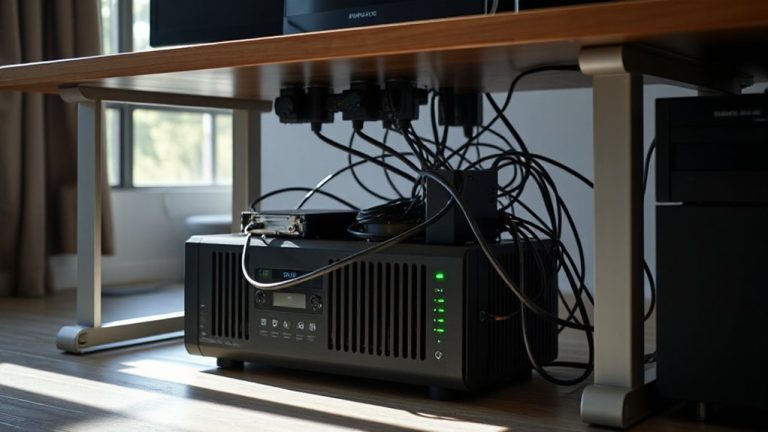
A surge protector shields your gear from sudden voltage spikes, but it won’t keep your network running when the power goes out-only a UPS can do that. A UPS provides battery backup so your router and modem stay powered during outages, giving you an uninterrupted connection for essential minutes or even hours. This lets you finish work tasks, stay in video calls, or safely save and log off. Look for a UPS with at least 600VA and pure sine wave output to match your modem and router’s wattage needs without risking damage. Units like the APC Back-UPS series offer reliable performance, surge protection, and automatic voltage regulation. While battery backup won’t last indefinitely, it gives breathing room during short outages. Just remember: runtime depends on load, so don’t overload it. Replacing the battery every 3–5 years keeps it effective. For more guidance on choosing the right model, see this top UPS picks buying guide.
Power Your Router and Modem First
Even if you’ve got a UPS in place, you’ll want to prioritize powering your router and modem first-everything else on your network depends on them, and keeping these core devices online preserves connectivity for phones, laptops, and smart home gear. Without the modem, there’s no internet; without the router, Wi-Fi strength drops to zero. Placing these devices at the top of your power hierarchy guarantees stable signal distribution. Other electronics can wait, but delays here increase signal interference risks from competing networks or obstacles. Most modern routers use 12V DC power supplies, so check their wattage to size your UPS correctly. Keep in mind: a router reboot after an outage can take 2–5 minutes to fully restore Wi-Fi strength. Don’t daisy-chain them with high-draw devices, or voltage fluctuations might throttle performance. Prioritizing them isn’t just convenient-it’s foundational for real-time communication and remote work reliability.
Fix Faulty Outlets Before They Crash Your Wi-Fi
You’ve prioritized your router and modem on the power stack, but that effort means nothing if the outlet feeding them can’t deliver stable voltage. A flickering indicator light or occasional network drop could point to a failing outlet. Perform routine outlet inspection: check for discoloration, loose plugs, or warmth-all signs of potential failure. Faulty outlets can introduce electrical noise or sudden disconnects, crashing your Wi-Fi without warning. Don’t overlook circuit balancing either; overloading a single circuit with appliances increases voltage instability. Split high-draw devices across circuits to maintain clean power flow. While outlet replacement is often a DIY fix, always shut off power at the breaker and test with a voltage meter first. If wiring shows wear or connections are compromised, hire a licensed electrician. Properly maintained outlets guarantee your network gear runs reliably without hidden power risks.
Maintain Your Surge Protectors and UPS Monthly
Regularly checking your surge protectors and UPS units each month guarantees they’re ready when power issues strike-because a unit that looks fine might actually have degraded protection. You should perform basic response testing: press the test button to confirm alarms or indicator lights activate as expected. For UPS systems, simulate outages to verify backup power kicks in smoothly. Over time, internal components wear, so equipment calibration can drift, reducing accuracy in voltage regulation. Replace units showing warning signs like flickering lights or delayed response. Most manufacturers recommend replacement every 3–5 years, even if no issues appear. Don’t rely on warranties alone-many cover only select failures. Monthly maintenance safeguards your networking gear stays protected without overinvesting in unnecessary replacements. It’s a small effort that prevents costly damage. Consider choosing models from top-rated Best Office Surge Protectors for reliable performance and enhanced safety features.
Choose the Right Power Setup for Your Home
A reliable power setup starts with matching your home’s electrical infrastructure to the demands of your network and connected devices. You need consistent voltage regulation to protect sensitive gear like modems and routers from fluctuations that can cause crashes or long-term damage. Invest in a power conditioner or an uninterruptible power supply (UPS) with built-in voltage regulation-look for units with a <5% voltage swing tolerance and at least a 3-year warranty. Opt for models with high energy efficiency ratings (80 Plus certified if it includes battery backup), so you’re not wasting power during normal operation. While whole-home surge solutions offer strong protection, they can be costly and require professional installation. Avoid cheap power strips; they lack proper regulation and efficiency features. Balance performance with your budget, but don’t compromise on voltage stability-your network’s uptime depends on it.
On a final note
You should power your home network smartly-start with a UPS to keep your router and modem running during outages, ensuring uninterrupted connectivity. Use surge protectors rated for at least 1,000 joules and check them monthly for wear. Prioritize network devices over others when restoring power. Avoid cheap power strips; they fail under load. A quality setup costs more upfront but prevents costly downtime and repairs in the long run.