Implementing Backup UPS Systems to Safeguard Your Critical Work Data During Outages
A backup UPS keeps your work safe during outages by giving you 5–10 minutes to save and shut down properly, plus it blocks surges that can fry your gear. Pick a 600–1000VA model with pure sine wave output and at least 600 joules of surge protection-enough for most home offices. Don’t overload it; keep critical devices like your PC and router under 80% of its rated capacity. Test the battery every few months and replace it every 2–3 years, since performance drops over time. Units with USB or network connectivity let you automate shutdowns and monitor status. Most setups take minutes: plug in, connect devices, install software, and verify compatibility. Look for models with AVR and replaceable batteries to extend lifespan. Warnings like beeping or fault lights mean it’s time to act. Smart placement away from heat and dust helps too-clean vents monthly. Knowing these details means you’ll avoid common failures and keep your setup resilient. There’s more to explore when tailoring one to your exact gear and workflow.
Notable Insights
- Choose a UPS with sufficient VA rating to support your critical devices and ensure safe shutdown during outages.
- Opt for pure sine wave output and automatic voltage regulation to protect sensitive electronics from power fluctuations.
- Connect only essential devices like computers and network equipment to the battery-backed outlets to maximize runtime.
- Install UPS management software to enable automatic data saving and graceful system shutdown during extended outages.
- Perform regular battery tests and replace the UPS battery every 2–3 years to maintain reliable backup protection.
How a UPS Protects Your Computer During Outages
While power outages can strike without warning, a UPS-uninterruptible power supply-gives your computer critical protection by keeping it running long enough to save work and shut down safely. It also guards against power surge damage, which can fry sensitive electronics in seconds. Without a UPS, sudden shutdowns raise the risk of data corruption, potentially losing hours of unsaved progress or damaging file systems. Most UPS units provide pure sine wave output and surge suppression, ensuring clean, stable power during grid fluctuations. They typically offer 5–10 minutes of runtime-enough for an orderly shutdown. Look for models with connected equipment warranties and automatic voltage regulation. However, they aren’t designed for long-term power or heavy loads. You’ll need proper sizing and regular battery replacement. A UPS is essential protection, but it’s only one part of a complete data backup strategy. For reliable performance, consider top-rated UPS models that balance runtime, protection features, and value.
Pick the Right UPS for Your Home Office
What’s the right UPS for your home office? You need one that balances power capacity, runtime, and surge protection without overspending. Start by adding up the wattage of your devices-computer, router, monitor-then choose a UPS with at least 20% more power capacity than that total. A 600–1000VA model usually covers most setups. Look for units with pure sine wave output and AVR (automatic voltage regulation) to keep sensitive electronics safe. Surge protection is essential; pick a model with a high joule rating-600+ joules-and coax protection if you use VoIP. Avoid cheap models; they often skimp on real-world battery life and durability. Check warranty length and connected equipment coverage-some brands offer three years. Read independent test results for runtime accuracy. While larger units offer longer backup, they’re heavier and cost more. Pick one that meets your actual outage needs.
Set Up Your UPS in Minutes
Once you’ve picked the right UPS, getting it up and running takes just a few minutes if you follow the correct steps. Quick installation is a major perk-just plug the unit into a wall outlet, connect your devices to the protected outlets, and power everything on. Most models come with software that alerts you during outages and safely shuts down your computer, but you’ll need to install a USB or network connection. Always check system compatibility: guarantee your devices’ power draw doesn’t exceed the UPS’s VA rating. Also, confirm the unit supports the voltage and frequency standards in your region. While setup is straightforward, misconnecting equipment or ignoring compatibility specs can void warranties or cause failures. Don’t overload it-reserve the battery-backed outlets for critical gear like your computer and monitor.
Test and Replace Your UPS Battery
Even though your UPS seems reliable right out of the box, its battery will degrade over time and eventually fail-so testing it regularly is essential for real protection. Battery degradation happens naturally, even if you don’t use the unit often, typically reducing capacity by 20% or more within three years. Most UPS models let you run a self-test with a button press, checking if the battery can still handle a short power cycling event. You should perform this test every three to six months. If the UPS beeps persistently, displays a fault light, or fails the test, it’s time to replace the battery. Replacing it yourself is usually simple-just open the panel and swap in a compatible model, often costing $40–$70. Don’t wait for a blackout to discover your UPS won’t hold a charge.
Keep Your UPS Running for Years
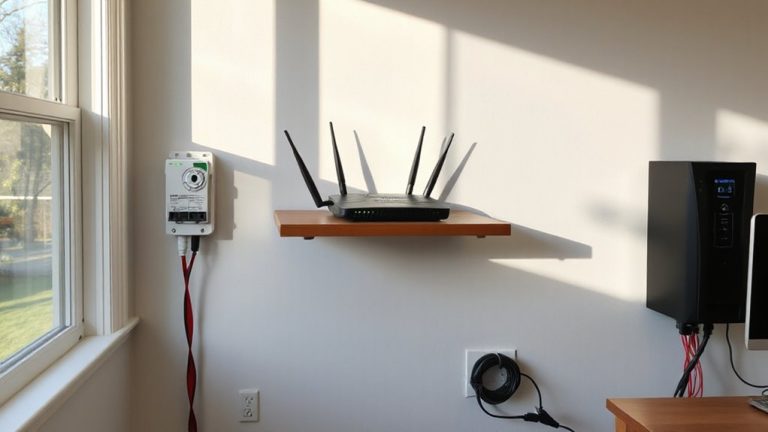
While your UPS can deliver years of reliable service, its lifespan depends heavily on how well you manage heat, load, and maintenance. To maximize longevity, place your unit in a well-ventilated area-avoid cramped spaces or near heat-generating equipment. Don’t overload it; keep total connected load below 80% of its rated capacity for stable performance and cooler operation. Regular maintenance scheduling is essential: inspect vents for dust monthly and use compressed air to clean them. Most manufacturers recommend replacing internal batteries every 2–3 years, even with light use. These longevity tips aren’t optional-they’re essential. Units exposed to high temps or frequent outages degrade faster. While premium models offer better surge protection and wider input voltage ranges, no UPS lasts forever. Monitor performance over time, and don’t ignore warning beeps or calibration errors-they signal underlying issues needing attention.
On a final note
A UPS is essential for protecting your home office gear during outages, giving you time to save work and shut down safely. Choose a model with at least 600VA and AVR to handle surges and voltage swings. Test the battery every six months and expect to replace it every 2–3 years. While it won’t run your system indefinitely, a good UPS delivers reliable, short-term backup exactly when you need it.