How to Position Your Elbows at 90 Degrees in Both Sitting and Standing Modes
Set your chair or standing desk so your elbows bend at 90 degrees with forearms parallel to the floor while typing. Keep upper arms vertical and shoulders relaxed to reduce strain. Use adjustable furniture-aim for 4+ inches of seat height range or a height-adjustable desk. If your setup feels off, small tweaks in chair or desk height often fix it. Comfort matters more than exact angles, so adjust until it feels right-your next move could make all the difference.
Notable Insights
- Adjust chair or desk height so elbows bend at 90 degrees with forearms parallel to the floor while typing.
- Keep upper arms relaxed and close to the body, hanging straight down from the shoulders.
- Use a height-adjustable desk to maintain proper elbow angle in both sitting and standing positions.
- Position the keyboard close to your body to avoid overreaching and maintain neutral elbow and wrist posture.
- Check alignment frequently and use armrests only if they support arms without elevating the shoulders.
Why 90-Degree Elbow Position Prevents Pain
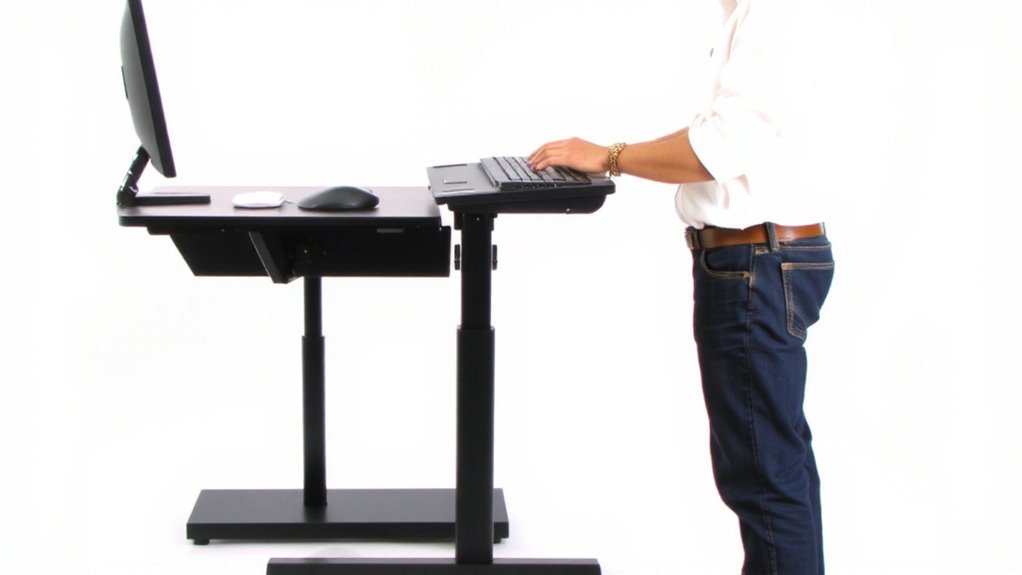
Most of the time, keeping your elbows at a 90-degree angle while working reduces strain on your shoulders, wrists, and neck-especially during long typing sessions. This position supports proper ergonomic alignment, helping distribute weight evenly across your upper body. When your elbows bend at 90 degrees, joint stress stays low, which means less fatigue and fewer overuse injuries over time. You’re more likely to maintain a neutral wrist posture and relaxed shoulders, both linked to lower discomfort. Sitting or standing, aligning your desk and chair or adjustable stand to keep arms parallel to the floor makes a real difference. But it’s not one-size-fits-all-some people need slight adjustments based on chair height or monitor position. Getting this right matters more than buying premium gear. Even the best keyboard or ergonomic chair won’t fix poor alignment. Stick to the angle, prioritize consistency, and pay attention to how your body responds. A well-chosen standing desk converter can make it easier to achieve and maintain this optimal elbow position throughout the day.
Check Your Elbow Angle: Are You in the Sweet Spot?

Where’s your elbow angle right now-hovering past 90 degrees or closer to 120? You’re likely outside the sweet spot, which could increase strain despite common ergonomic myths suggesting otherwise. A true 90-degree bend optimizes wrist alignment and reduces shoulder tension, but joint flexibility varies-some people naturally sit comfortably between 80–100 degrees. Don’t assume one angle fits all; test what feels stable during extended typing. Avoid forcing rigid postures that compromise circulation or cause fatigue. While many chairs and desks claim to “fix” posture, they can’t override your body’s unique mechanics. Adjustable arms on office chairs help, but only if you actively monitor your form. Real-world testing shows minor deviations from 90 degrees are acceptable if pain-free. Prioritize consistent comfort over idealized rules. Choosing the right chair with proper adjustable armrests can make maintaining this optimal elbow position significantly easier throughout the day.
Set Chair Height for a 90-Degree Elbow Bend
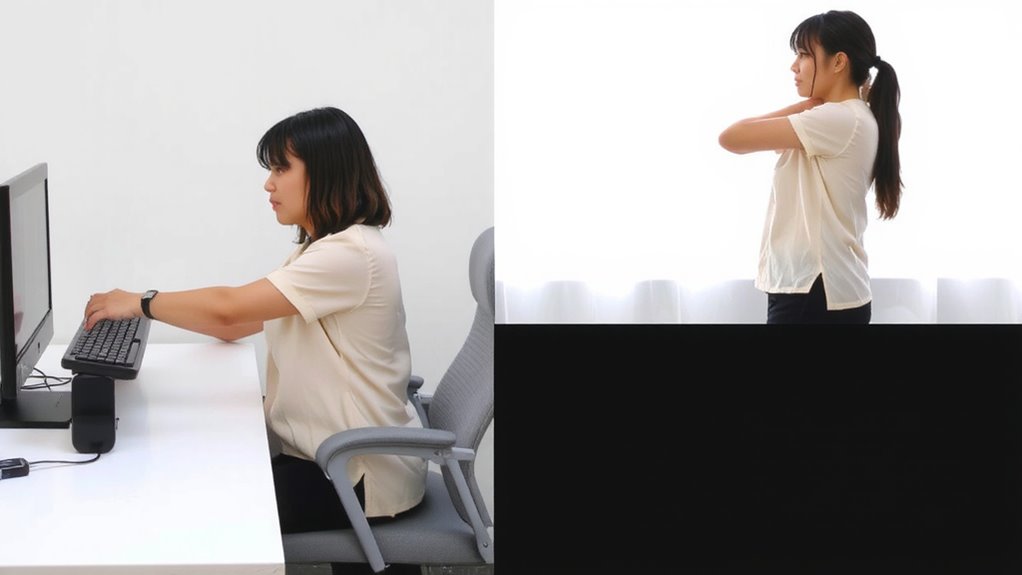
Start by adjusting your chair height so your elbows rest at a 90-degree angle when your hands are on the keyboard-this usually means your upper arms hang straight down from your shoulders. Proper chair alignment guarantees your shoulders stay relaxed and movement stays efficient. Without it, you risk strain over time. Look for chairs with at least 4 inches of seat-height adjustment to fine-tune support. Built-in lumbar and seat-depth adjustments help, but your primary focus should be arm support. Your chair arms-if present-shouldn’t force your elbows up or block forearm movement. A well-positioned chair reduces load on your wrists and neck. But remember: even the best chair won’t fix a poorly placed desk. You’ll still need to verify your setup matches your body and desk dimensions. Get it right, and you’ll notice less fatigue during long work sessions. For those incorporating custom-printed food into their workspace or events, using a printer with edible ink cartridges ensures safe and creative presentation.
Adjust Desk Height and Depth for Neutral Arms
With your chair set to support a 90-degree elbow bend, it’s time to fine-tune your desk height and depth so your arms stay neutral while typing or using a mouse. Proper elbow alignment and arm support reduce strain over long sessions. Adjust your desk so your forearms run parallel to the floor when hands are on the keyboard. If using a fixed desk, choose one with height and depth settings that match your body.
| Feature | Why It Matters |
|---|---|
| Height-adjustable desk | Guarantees elbow alignment at 90 degrees |
| Depth of 24–30 in | Lets you pull closer, reducing reach |
| Smooth mechanism | Prevents wobble, maintains arm support |
| Sturdy frame | Minimizes vibration during use |
| Limited adjust range | May not fit very tall or short users |
Place Keyboard and Mouse for Wrist-Friendly Typing
Once you’ve set your desk and chair to maintain a 90-degree elbow angle, positioning your keyboard and mouse correctly becomes key to protecting your wrists during long typing sessions. You need proper wrist alignment-keep your wrists straight, not bent up, down, or to the sides. Your keyboard should sit directly in front of you, close enough that reaching it doesn’t lift your forearms off the desk. This guarantees consistent forearm support, reducing strain. Place the mouse near the keyboard at the same height, so hand movements stay smooth and neutral. Avoid extended reaches or elevated wrists, which spike muscle activity. While split or ergonomic keyboards can help maintain alignment, they’re not mandatory if your current setup supports neutral posture. Just make sure your gear allows your arms and wrists to stay relaxed, with elbows at 90 degrees and shoulders loose.
Fix Standing Desk Height to Maintain 90 Degrees
If you’re using a standing desk, getting the height right is essential-set it so your elbows bend at roughly 90 degrees when your hands are on the keyboard, just as you would at a seated station. Proper elbow alignment reduces strain and supports long-term comfort. You’ll also need adequate desk clearance to position your arms and chair (if used intermittently) without obstruction. Ignoring these factors may lead to shoulder tension or wrist deviation over time.
| What You Feel | What It Means |
|---|---|
| Fatigue after 20 minutes | Desk too high or low |
| Comfort and ease typing | Correct elbow alignment |
| Legs bumping structure | Poor desk clearance |
Adjust slowly, test multiple heights, and reassess after 5–10 workdays. Not all frames fit all desks-measure your body and equipment. Most quality desks offer 22–48 inches in height range, which accommodates average users when paired with proper footwear and mat support.
Correct These 3 Posture Mistakes That Wreck Your Elbow Angle
Why do your elbows creep past 90 degrees by midday? Slouching, chair height mismatches, and overreaching for your keyboard slowly wreck your elbow angle. First, leaning forward kills joint stability-your spine curves, shoulders roll, and elbows drift outward. Sit with your back supported and screen at eye level. Second, if your chair’s too high or low, your arms won’t stay neutral. Adjust it so forearms are parallel to the floor. Third, placing a keyboard too far away forces reach, straining elbow flexibility and stressing tendons. Keep it within 2 inches of your body. These fixes help, but only if you move regularly. Static postures-even good ones-cause fatigue. Use timer reminders. No gear upgrade replaces mindful posture, so prioritize movement over cushioned wrist rests or ergonomic claims with no testing data.
On a final note
You should keep your elbows at 90 degrees to reduce strain, whether sitting or standing. Set your chair or desk so your arms hang naturally, shoulders relaxed. Use a height-adjustable desk and ergonomic chair with seat-depth adjustment for consistency. Warranties on quality frames typically cover five years, but real-world tests show wear on gas lifts in cheaper standing desks. Results vary; small adjustments matter, but perfect ergonomics depend on your body and routine.