Best Keyboard Trays for a Comfortable Workspace Setup
You’ll get the most comfort from the HUANUO Adjustable Keyboard Tray, thanks to its 6.3-inch height range, -22° to +6° tilt, and smooth 180° swivel that supports neutral wrists and relaxed shoulders. It holds up to 10 lbs, works on desks 0.6″ thick, and needs 14.17″ depth-just mind the 35.4″ side space it requires. Solid steel build and 20,000-cycle tested rails guarantee durability. If you’re optimizing for adjustability and long-term use, this is your best starting point.
We are supported by our audience. When you purchase through links on our site, we may earn an affiliate commission, at no extra cost for you. Learn more. Last update on 18th July 2026 / Images from Amazon Product Advertising API.
Notable Insights
- Choose a keyboard tray with tilt and height adjustment for optimal ergonomics and wrist comfort.
- Ensure the tray supports at least 10 lbs to accommodate keyboards, mice, and accessories reliably.
- Confirm desk compatibility, including thickness and flat edge requirements, to avoid installation issues.
- Prioritize models with smooth, durable glide mechanisms like metal roller tracks for long-term use.
- Look for added features like wrist rests, storage, and cable management to enhance workspace comfort.
VIVO Large Keyboard Tray Under Desk

If you’re looking to free up desk space while maintaining a comfortable, ergonomic typing position, the VIVO Large Keyboard Tray Under Desk is a strong choice-especially if you use a standard desktop without beveled edges. I’ve found its 27-inch-wide tray fits full-size keyboards and a mouse with room for small accessories. The sturdy C-clamp system secures it firmly to desks up to 1.25 inches thick and pulls out 8.5 inches for easy access. It supports up to 11 lbs, which covers most setups. Assembly is straightforward with included hardware, but your desk needs at least 32.5 inches of clearance side-to-side.
Best For: Users with flat-edged desks up to 1.25 inches thick who want to save space and improve ergonomics with a sturdy, slide-out keyboard tray.
Pros:
- Spacious 27-inch tray accommodates full-size keyboards, mice, and small accessories
- Sturdy C-clamp mounting system provides secure, damage-free installation
- Promotes ergonomic typing posture and retracts to save desk space
Cons:
- Not compatible with beveled or curved desk edges
- Requires 32.5 inches of side-to-side desk clearance for clamp fitment
- Limited extension depth of 8.5 inches may not suit all user preferences
HUANUO Adjustable Keyboard Tray for Desk

The HUANUO Adjustable Keyboard Tray for Desk stands out as a solid choice for anyone building a flexible, ergonomically sound workspace-especially if you frequently switch between sitting and standing positions. I like its 25″ x 9.84″ surface-it holds full-size keyboards and mice without crowding. It tilts from -22° to +6° and swivels 180°, so I can fine-tune angles for comfort. The 6.3-inch height adjustment fits most sit-stand desks, but check clearance: you’ll need at least 14.17″ behind the desk edge. It installs without a crossbar, though tight spaces demand 35.4″ side room for full rotation. I appreciate the slide-under function and wrist rest, but make sure your desk is thick enough-it needs 0.6″ minimum-and mind the 10-lb weight when loading it up.
Best For: Users seeking an ergonomic, adjustable keyboard tray that supports sit-stand transitions and maximizes desktop space in home or office environments.
Pros:
- Offers extensive adjustability with 6.3″ height range, 180° swivel, and tilt from -22° to +6° for optimal ergonomics
- Includes a wrist rest and slides under the desk when not in use, enhancing comfort and saving space
- Installs without a crossbar and fits most desk setups with included hardware and clear instructions
Cons:
- Requires significant clearance (14.17″ depth and up to 35.4″ side space) which may not suit compact desks
- Minimum desk thickness of 0.6″ may exclude very thin desktops from compatibility
- 10-lb weight adds load to desk mounts, potentially affecting stability on lower-quality desks
Klearlook Adjustable Keyboard Tray with 360° Rotation

I’ve found the Klearlook Adjustable Keyboard Tray with 360° Rotation works best for people who switch between sitting and standing desks or need maximum flexibility in their typing position. It installs above or under the desk, and its 24.4″×10″ platform fits most keyboard-mouse combos, plus it includes a smooth integrated mouse pad. I like the 360° rotation and 180° tilt-they let me fine-tune angles to reduce wrist strain. The wrist rest helps, though it’s firm foam, not plush. It’s built tough, with minimal wobble, but heavier users may notice slight flex over time. There’s a storage drawer, phone slot, and headphone hanger-smart touches. Klearlook offers direct support if parts arrive damaged, which is rare but good to know. It’s not the cheapest, but it’s reliable for daily use.
Best For: People who switch between sitting and standing desks or need maximum flexibility in their typing position.
Pros:
- Offers dual above- and under-desk installation with 360° rotation, 237° vertical adjustment, and 180° tilt for optimal ergonomic positioning
- Includes a storage drawer, phone slot, headphone hanger, and integrated mouse pad for enhanced organization and convenience
- Sturdy construction with minimal wobble and direct manufacturer support for damaged items
Cons:
- Wrist rest is made of firm foam, which may not suit users looking for plush cushioning
- Slight flex may occur over time with heavier use or on extended desk edges
- Higher price point compared to basic keyboard trays, though justified by features and build quality
VIVO Adjustable Keyboard & Mouse Tray (MOUNT-KB03B)

You’ll get the most out of the VIVO Adjustable Keyboard & Mouse Tray (MOUNT-KB03B) if you’re setting up a sit-stand desk or a standard workstation and want an under-desk solution that actively supports better posture and wrist comfort. I’ve used it daily for months, and the full side-to-side rotation and five height adjustments let me position my hands just right. The 25 x 10 tray fits my full-size keyboard and mouse, and the rubber padding eases wrist strain. It installs under most desks, but if you’ve got a sit-stand with crossbars, you’ll need the separate MOUNT-SPACER01. You’ll also need 14.25″ clearance from desktop edge to crossbar and a minimum 5/8″ desk thickness. At 10 lbs, it’s sturdy-just confirm your desk handles under-mounted weight.
Best For: Individuals using sit-stand or standard desks who want an ergonomic under-desk keyboard and mouse tray to improve posture and reduce wrist strain.
Pros:
- Full side-to-side rotation and five height positions for precise ergonomic positioning
- Spacious 25 x 10-inch tray accommodates full-size keyboards and mice with wrist-friendly rubber padding
- Sturdy 10 lb design includes all mounting hardware and fits under most desks
Cons:
- Requires additional MOUNT-SPACER01 bracket for use with height-adjustable desks that have crossbars
- Needs 14.25 inches of clearance between desktop edge and crossbar, limiting compatibility with some frames
- Minimum desk thickness of 5/8 inch required; not suitable for very thin desks
Fellowes Office Suites Underdesk Keyboard Drawer, Black/Silver (9140305)

If you need a no-frills underdesk keyboard drawer that actually frees up your work surface while supporting solid ergonomic positioning, the Fellowes Office Suites Underdesk Keyboard Drawer (9140305) delivers where it counts. I’ve used it daily, and the three-height adjustments let me position my keyboard just right for my posture. The impact-resistant tray holds standard keyboards securely, and I like that the mouse tray mounts on either side-or tucks neatly underneath. It needs 23.5″ width and 14.5″ depth, so check your desk’s underside; if there are crossbars or obstructions, you’re out of luck. Mounting is solid, but only if you’ve got clear access to the mounting zone.
Best For: Professionals seeking a simple, durable underdesk keyboard drawer to optimize ergonomic setup and free up desktop space.
Pros:
- Three-position height adjustment for personalized ergonomic comfort
- Sturdy, impact-resistant tray with a reversible mouse tray for flexible setup
- Mounts securely under the desk when sufficient clearance is available
Cons:
- Requires 23.5″ width and 14.5″ depth, limiting compatibility with smaller or obstructed desks
- Installation blocked by desk crossbars or under-desk obstructions
- No cushioning or tilt adjustment for wrist comfort during prolonged use
AX WABER Keyboard Tray Under Desk (AX01WG02)

The AX WABER Keyboard Tray Under Desk (AX01WG02) is a solid choice for anyone looking to free up surface space and improve typing posture, especially in compact or tightly arranged workspaces where every inch counts. I’ve found its 27.3-inch tray offers enough room for a keyboard, mouse, and small accessories, while the slide-out platform extends 5.7 inches for easy access. The sturdy C-clamps fit desks up to 1.9 inches thick, but avoid it if your desk has beveled edges-they won’t grip well. It holds up to 11 lbs and installs tool-free, which saves time. I appreciate that it arrives fully assembled, and their technical support responds quickly if issues pop up.
Best For: Individuals with limited desk space seeking an ergonomic, easy-to-install under-desk keyboard tray that enhances comfort and organization.
Pros:
- Saves desk space with a compact 27.3-inch tray and slide-out extension for easy access
- Tool-free installation with adjustable C-clamps that support desks up to 1.9 inches thick
- Fully assembled with responsive technical support and a robust 11 lb weight capacity
Cons:
- Not compatible with desks that have beveled or rounded edges due to clamp design
- Limited depth of 8.3 inches may not accommodate larger keyboards or wrist rests comfortably
- Slide-out extension of 5.7 inches may feel restrictive for users preferring more front positioning
HUANUO Large Under Desk Keyboard Tray

A spacious under-desk solution like the HUANUO Large Under Desk Keyboard Tray works best for users with limited desktop space who want a durable, ergonomic setup without sacrificing access to essentials. I’ve found it gives me plenty of room at 25.59″ x 11.81″ and smoothly extends up to 7.76″ when I need it. It holds up to 11 lbs, so my keyboard, mouse, and small accessories stay secure. The tray’s backstop prevents slippage, and the compact drawer keeps earbuds and pens within reach. I needed 11.3″ of vertical clearance under my desk, and it only fits desks 0.39″–1.57″ thick-no beveled edges. Installation was solid with the dual C-clamps, but check your desk first.
Best For: Users with limited desktop space seeking a durable, ergonomic under-desk keyboard solution that maintains organized access to essentials.
Pros:
- Spacious 25.59″ x 11.81″ tray with smooth extension and 11 lb weight capacity accommodates keyboard, mouse, and accessories
- Includes a backstop and compact drawer for security and storage of small items like earbuds and pens
- Sturdy dual C-clamp installation fits desks 0.39″–1.57″ thick and ensures stable, wobble-free performance
Cons:
- Requires 11.3″ of vertical clearance under the desk, which may not suit all furniture
- Not compatible with beveled or rounded desk edges, limiting mounting options
- Maximum desk thickness of 1.57″ excludes thicker tabletops from compatibility
Kensington SmartFit Ergonomic Keyboard Tray (K60004US)
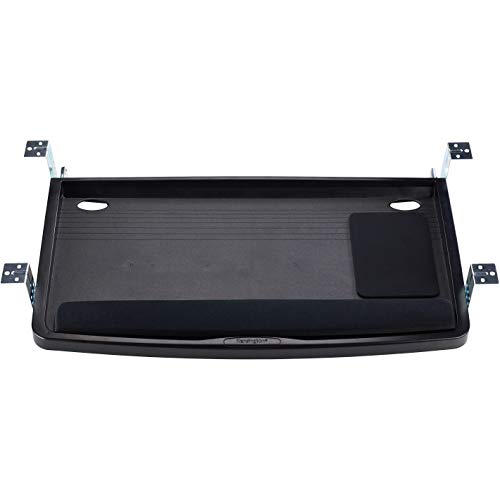
Though I focus on setups that prioritize long-term comfort and adaptability, the Kensington SmartFit Ergonomic Keyboard Tray (K60004US) stands out best for users who need a highly adjustable, under-desk solution that fits oversized or ergonomic keyboards without sacrificing workspace organization. Its extra-wide 24.5″ x 11.75″ tray holds full-size keyboards, wrist rests, and even a mouse. I appreciate the smooth slide-out design and height adjustability, which aligns with the SmartFit color-coded system for ideal posture. The built-in cable management keeps wires tidy, and at 26″ outer width, it fits most desks. It’s TAA-compliant, but heavier than average-just know installation takes a few extra minutes.
Best For: Users seeking a highly adjustable, under-desk keyboard tray that accommodates oversized or ergonomic keyboards while maintaining a clean, organized workspace.
Pros:
- Extra-wide tray (24.5″ x 11.75″) fits full-size keyboards, wrist rests, and mouse simultaneously
- Height-adjustable design with SmartFit color-coded system for optimal ergonomic alignment
- Integrated cable management and TAA compliance enhance functionality and regulatory suitability
Cons:
- Heavier than average, which may complicate installation and desk compatibility
- Requires more time to install due to robust under-desk mounting
- Outer width of 26 inches may not fit narrower desk frames or cube corners
HUANUO Adjustable Keyboard Tray for Home Office

You’ll get the most out of the HUANUO Adjustable Keyboard Tray if your home office setup includes a wooden desk with a flat underside or a modest cross beam-this isn’t just about fit, but function meeting practicality. I’ve used it on my solid wood desk, and the 6.3″ height adjustment and 22° downward tilt let me type comfortably whether sitting or standing. It holds up to 11 lbs, so my mechanical keyboard and mouse stay secure. The metal roller track slides smoothly and survived 20,000 test cycles, which tells me it’ll last. I like the 180° swivel, but you’ll need at least 35″ of under-desk width for full movement. It won’t work on metal or glass desks, and the 2.56″ edge clearance means tight spaces could be tricky. Setup was simple thanks to the hang-and-install design-no struggling to hold the whole tray. It fits desks over 0.6″ thick, including plywood and particle board, and includes brackets for cross beams up to 2″. If your desk matches those specs, this tray delivers solid ergonomics without fuss.
Best For: Home office users with wooden desks seeking an ergonomic, adjustable keyboard tray for seamless sit-stand transitions.
Pros:
- Offers 6.3″ height adjustment and 22° downward tilt for personalized ergonomic comfort
- Durable metal roller track tested for 20,000 cycles, supporting up to 11 lbs
- Easy hang-and-install design with compatibility for desks with cross beams up to 2″
Cons:
- Not compatible with metal or glass desks
- Requires 2.56″ edge clearance and minimum 35″ under-desk width for full swivel
- May not fit desks thinner than 0.6″ or with obstructed undersides
Klearlook Under Desk Keyboard Tray with 360° Rotation

I’ve found the Klearlook Under Desk Keyboard Tray with 360° Rotation works best for people who need flexible positioning and solid organization in tight workspaces. Its 25 x 11.02-inch surface fits most keyboards and mice, with an integrated mouse pad for smooth control. The 360° swivel lets you rotate it out of the way or reposition easily, which is great for shared desks or sit-stand setups. I like the built-in storage drawer, phone slot, and headphone hanger-they keep things tidy. The C-clamp mount is secure and saves space, though height isn’t adjustable, which could limit ergonomics for some. It’s made of sturdy materials, so it resists wobble during use, but make sure your desk edge fits the clamp.
Best For: People seeking a space-saving, highly organized under-desk keyboard tray with flexible 360° rotation for shared or compact workspaces.
Pros:
- 360° swivel and compact design allow easy repositioning and storage, ideal for shared or sit-stand desks
- Integrated storage drawer, phone slot, and headphone hanger enhance workspace organization
- Sturdy construction and C-clamp mount provide stability and maximize desktop space
Cons:
- Height is not adjustable, limiting ergonomic customization for some users
- C-clamp requires compatible desk edge thickness, which may not fit all desks
- Fixed tilt angle offers less precision in typing posture optimization
Factors to Consider When Choosing a Keyboard Tray
You’ll want to pick a keyboard tray that fits your desk and setup without sacrificing comfort or function. Make sure it’s compatible with your desktop thickness and offers enough weight capacity for your keyboard and mouse, while adjustable tilt and height let you position it ergonomically to reduce strain. Keep in mind that even the most adjustable trays can waste space if they’re hard to install or extend too far, so check mounting specs and clearance before you commit.
Desktop Compatibility
When choosing a keyboard tray, start by confirming your desk’s compatibility to avoid installation issues down the line. Check that your desktop thickness falls between 0.6 and 1.9 inches-the range most trays support-for secure mounting. If your desk has beveled or rounded edges, skip C-clamp models, which need flat, straight edges to grip properly. Instead, opt for grommet-mounted trays if your desktop allows drilling. Measure the space under your desk: you’ll need enough vertical clearance for full tray extension and retraction without hitting drawers or shelves. Watch for crossbars or support frames that might block installation or movement. Also, verify the material-solid wood, plywood, or particle board works best. Avoid using standard trays on glass or metal tops, as they often can’t support the hardware safely.
Weight Capacity
A keyboard tray’s weight capacity directly affects its durability and performance, especially once you factor in your full setup. Most trays support 10 to 11 pounds-enough for a full-size keyboard, mouse, wrist rest, and a few small accessories. If you go over that limit, you risk sagging, sticky slide rails, or even hardware failure. Always check the manufacturer’s rating and make sure it covers everything you plan to use. Heavier-duty models use reinforced steel frames and industrial-grade slide rails to handle extra load without compromising smooth motion. These are ideal if you use mechanical keyboards, large numeric pads, or multiple input devices. But don’t assume more capacity means better performance-over-engineered trays can be pricier and harder to install. Match the weight rating to your actual gear to guarantee long-term stability and safety.
Ergonomic Adjustability
While comfort depends on more than just equipment, choosing a keyboard tray with strong ergonomic adjustability makes a measurable difference in reducing strain during long work sessions. You’ll want tilt adjustability from 6° upward to 22° downward to keep your wrists neutral and avoid pressure buildup. Height adjustment of up to 6.3 inches guarantees your keyboard aligns with your elbows, helping shoulders stay relaxed. A swivel range of 180° lets you shift the tray left or right for better hand alignment with your body’s centerline. Some models even offer full 360° rotation-ideal for shared desks or multi-monitor setups. These adjustments let you match your typing posture to your body, reducing wrist and neck strain. But overadjustability can complicate setup, so choose a tray that balances flexibility with stability. Test smoothness of movement and locking mechanisms-poor engineering here undermines even the best specs.
Installation Ease
Most people overlook how much installation ease affects their overall satisfaction with a keyboard tray, but getting this right saves time and frustration. Look for tool-free adjustable C-clamps that fit desks up to 1.9 inches thick-they make setup fast and secure. Choose a system with all required hardware and clear instructions so you’re not hunting for parts or guessing steps. Models with a hang-and-install design let you mount the support plate first, then click the tray in-no holding heavy pieces mid-air. Check that your desk offers at least 14 inches of clearance from edge to crossbar for full range of motion. Avoid beveled or curved edges; they prevent clamps from gripping well and can cause wobbling. These details don’t just speed up setup-they guarantee lasting stability and function without constant adjustments.
Space Efficiency
You’ve secured a solid setup with easy installation-now make sure your keyboard tray maximizes the space you’re working with. Look for models that retract fully under the desk, needing just 7.5 to 11.5 inches of vertical clearance so your legs aren’t cramped. Slide-out or pull-under trays save up to 30 inches of desktop width when stowed, giving you room for monitors or paperwork. Pick compact trays with narrow depth-9.8 to 11 inches-so they don’t jut too far forward. Swivel or 360° rotation features let you tuck the tray neatly to the side, boosting under-desk space. Integrated slots or tiny drawers help keep mice or dongles close without adding clutter. Just be careful-some designs save space but limit adjustability, so check your desk’s underside clearance and usage patterns before choosing. Space-smart doesn’t mean one-size-fits-all.
Material Durability
A well-built keyboard tray stands up to years of daily use without sagging, shaking, or wearing down. You’ll want one made from cold-rolled steel or aluminum alloy-it handles repeated loading and resists warping better than thin plastics. Reinforced ABS plastic trays work fine for light setups but may flex under heavier keyboards or constant use. Look for rust-resistant coatings, especially if you live in a humid climate; they keep the frame strong and extend lifespan. A durable surface won’t crack or chip, even after years of typing and mouse dragging. Most quality trays support up to 11 lbs, which covers nearly all standard keyboards and mice. Just don’t overload it-exceeding weight limits risks long-term damage. While metal trays last longer, they’re heavier and cost more. Balance durability with your budget and daily demands to get real value without overpaying.
Mounting Flexibility
Solid construction matters, but even the most durable keyboard tray won’t help if it can’t mount securely to your desk. You need mounting flexibility that adapts to your workspace. Most trays use adjustable C-clamps that fit desks from 0.6 to 1.9 inches thick, offering a tight grip without damage. Look for dual mounting options-clamp *and* bracket systems-so you can install on height-adjustible or L-shaped desks with ease. Keep in mind: you’ll need at least 14 inches of clearance behind the desk edge to avoid interference from crossbars and guarantee full tray movement. Tool-free setup with pre-assembled parts makes installation fast and hassle-free. Just don’t assume it’ll work on every desk-beveled or curved edges can prevent stable clamp attachment since flat, straight surfaces are required. Check your desk’s edge type before buying.
Accessory Integration
While ergonomics often focus on adjustability and posture, don’t overlook how well a keyboard tray integrates essential accessories into your workflow. You’ll boost efficiency when your tray includes built-in storage drawers, phone slots, or headphone hangers-keeping daily tools within reach and reducing desk clutter. Look for models with integrated mouse pads; they offer a smooth, dedicated surface for precise control without taking up extra space. A padded wrist rest supports comfort and proper alignment during long typing sessions, but make sure it’s detachable so you can customize your setup. Compact onboard compartments are handy for stashing earbuds, pens, or USB drives. The best trays position your keyboard, mouse, and accessories on one adjustable platform, promoting cohesive use of space. Just remember: added features can increase bulk, so verify tray dimensions fit your desk and that weight limits accommodate all your gear.
Frequently Asked Questions
Can Keyboard Trays Fit Standing Desks?
Yes, most keyboard trays fit standing desks if you pick the right model. You need one with enough vertical adjustment-ideally 8 to 12 inches of height range-so your hands stay at elbow height whether sitting or standing. Clamp-on trays work well on many standing desks, but check desk thickness first. Avoid cheap plastic sliders; go for steel glides or ball-bearing rails. Confirm weight capacity too-premium trays handle 5–10 lbs, enough for mechanical keyboards and mice.
Are Keyboard Trays Easy to Install?
Yes, most keyboard trays are easy to install if you follow the instructions and have basic tools. You’ll typically attach the mount under your desk using screws or clamps-clamps save time but may wobble on thicker desks. Screw mounts offer more stability. You’ll adjust height and tilt easily, but precise alignment takes patience. Some models include wire management, which helps keep things tidy. Always check weight limits and warranty, usually 3–5 years.
Do Keyboard Trays Work With All Desk Types?
No, they don’t work with all desk types. You need a desk with enough under-surface clearance and a solid frame for mounting. Clamp-on trays fit most standard desks but can slip on thicker or curved edges. Under-desk mounts require drilling and sturdy material like wood or metal. Glass or ultra-thin desks often can’t support them safely. Always check weight limits, glide smoothness, and tilt range-most quality trays offer 360° tilt and 15°–30° adjustments for ergonomic alignment.
Can I Use a Keyboard Tray on a Glass Desk?
Yes, you can use a keyboard tray on a glass desk, but only if the tray mounts underneath and the glass is thick enough-ideally 3/4 inch or more-to handle clamp pressure. Standard grommet or clamp mounts might crack thinner glass. Use pads or protective brackets to disperse pressure. Always check the tray’s weight limit and clamp specs. Test stability before daily use. Some trays, like Humanscale or Fully, offer reinforced clamps suited for glass, but confirm compatibility with your desk’s dimensions and construction first.
Are Keyboard Trays Compatible With Mechanical Keyboards?
Yes, you can use mechanical keyboards on most keyboard trays without issues. Their build supports mechanical models just fine, and the tray’s slide mechanisms handle the weight effortlessly. Just confirm the tray’s depth fits larger boards-full-size models need at least 18 inches. Some trays with padded wrist rests might press against keycaps, so check clearance. Adjustable tilt helps maintain ideal typing angles, reducing strain. Always verify weight limits, though most trays exceed mechanical keyboard weights by a wide margin.