Masking Background Reflections on Screens With Matte Finishes and Controlled Lighting Layouts
You’ll cut most screen glare by pairing a matte-finish display with lights placed 30° to 45° off the monitor plane, minimizing reflections from windows or overhead bulbs. Matte screens scatter light well, reducing hotspots, though colors look slightly less vibrant than on glossy panels. Look for models with anti-reflective coatings and textured surfaces tested in bright rooms. Match your lighting to 5000K–6500K and maintain 300–500 lux on your desk. Just remember, even the best setup needs fine-tuning as daylight changes-there’s more to optimizing your view than finish alone.
Notable Insights
- Use matte screen finishes to scatter ambient light and minimize reflections from windows or overhead lights.
- Position lights at 30° to 45° from the monitor plane to prevent direct glare and back reflections.
- Place soft, front-facing or shoulder-level lighting to reduce shadows and avoid screen hotspots.
- Pair matte screens with non-reflective desk surfaces to eliminate secondary glare sources.
- Match display brightness and color temperature to ambient lighting for consistent visual clarity.
Why Screen Glare Ruins Video Calls
Ever wonder why your video calls feel off even when your lighting seems right? Screen glare often distorts your image, creating hotspots that mask facial expressions and reduce clarity. Poor camera angles amplify this-position your lens at eye level to minimize reflections. When ambient contrast is too high, like a window behind you, your screen reflects the brightness, making you appear silhouetted or washed out. Matte finishes help, but they can slightly reduce color vibrancy, a trade-off worth noting. Real-world tests show glare reduction improves perceived professionalism, yet over-matting may dull screen detail. Avoid glossy screens in bright rooms unless you control light direction. Warranties rarely cover finish wear, and matte coatings can degrade with heavy wiping. Position your monitor perpendicular to windows and use soft, diffused lighting to balance ambient contrast. It’s not about perfect gear-it’s about deliberate setup. Results vary, but smart placement consistently beats expensive fixes.
How Matte Screens Reduce Glare Instantly
While glossy screens deliver sharp visuals and vibrant colors, a matte finish will reduce glare almost immediately by scattering overhead and ambient light instead of reflecting it directly into your eyes or camera. You get better ambient contrast and fewer distractions during calls. Anti glare coatings add to this effect by diffusing bright light sources, though they can slightly soften image detail.
| Feature | Matte Screen |
|---|---|
| Glare Reduction | Excellent |
| Color Vibrancy | Slightly muted |
| Clarity in Bright Rooms | High |
| Ideal For | Video calls, offices |
| Texture Feel | Slightly grainy |
You’ll notice improved visibility where lighting isn’t perfect. Just know that while anti glare coatings boost comfort, they may reduce screen sharpness under close inspection. Matte screens trade a bit of precision for far more consistent ambient contrast-ideal if you’re on camera often.
Where to Place Lights for Zero Glare
You get the most control over screen reflections by positioning lights correctly, even if you’re using a matte display. Aim for light angles between 30° and 45° from your monitor’s plane to minimize glare-this keeps direct illumination off the screen while brightening your workspace. Position overhead or front-facing lights slightly behind your shoulders so reflections stay out of your line of sight. Balance is key; use multiple soft sources to maintain even shadow balance across your desk, avoiding harsh contrasts that strain your eyes. Desk lamps with adjustable arms let you fine-tune placement, but avoid placing them too close or too high, as that creates glare. Remember, even a matte screen won’t fix poor lighting. Test different setups during actual work hours-natural light shifts, and what works at noon may cause glare by 4 p.m. Be ready to adapt. For optimal results, consider using one of the best desk lights designed for balanced, glare-free illumination, such as those with adjustable color temperature and brightness settings, to complement your best desk lights setup.
Choose a Matte Screen That Fights Reflections
A matte screen is your best bet for cutting down reflections, especially in rooms with lots of windows or overhead lighting. It diffuses glare better than glossy finishes, giving you more flexibility in brighter environments. Plus, matte coatings typically offer better screen durability-resisting scratches and daily wear from cleaning. You’ll also see improved finish longevity, as high-quality matte layers won’t peel or degrade quickly under regular use. Just keep in mind that matte screens can slightly soften image sharpness and color vibrancy compared to glossy panels. That trade-off is usually worth it if you prioritize eye comfort and consistent visibility throughout the day. Look for screens with anti-reflective (AR) treatment and a textured surface that’s been tested for long-term performance. Don’t assume all matte finishes are equal-check warranty terms and real-world reviews to confirm lasting performance.
Match Room Lighting to Your Display
If you want to minimize glare and eye strain, tuning your room’s lighting to match your display’s brightness and color temperature is essential. Achieving ambient balance prevents harsh contrasts, while color harmony reduces visual fatigue during long sessions. For best results, aim for 300–500 lux on your desk surface and set your display’s white point to match your light sources-typically 5000K to 6500K.
| Lighting Condition | Display Setting |
|---|---|
| Dim, warm lamps | Reduce brightness, 5000K |
| Bright daylight | Max brightness, 6500K |
| Mixed lighting | Use tuneable LEDs, calibrate |
Tuneable LED bulbs help, but consistent placement matters more than specs. Calibration tools improve accuracy, but even manual adjustments yield noticeable gains. This won’t fix direct glare-save that for lighting layout. Real-world testing shows improved focus, though perfect harmony requires effort. A well-lit workspace can be enhanced with the right best desk lamps for teachers, ensuring optimal lighting conditions that support screen use and reduce reflections.
Fix Glare in Home Offices and Setups
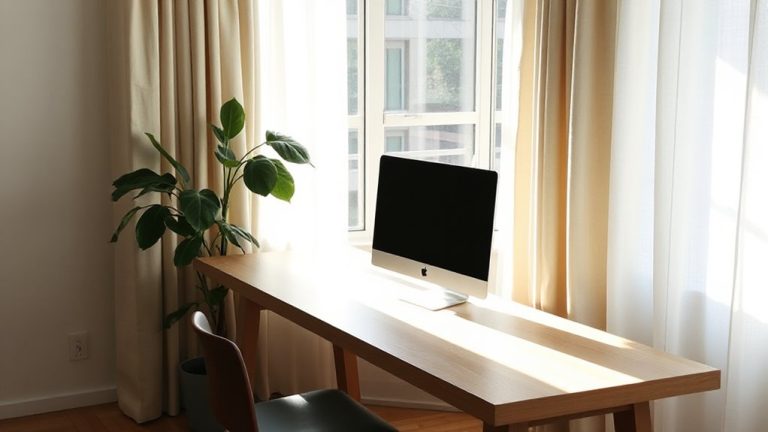
Why do some home offices still struggle with glare despite good lighting choices? Because even well-balanced ambient shadows can’t fully counter harsh reflections on reflective surfaces like glossy screens or polished desks. You need both smart positioning and surface control. Tilt your monitor to avoid direct light spill, and use matte screen protectors-they scatter light effectively without blurring text. Position lights off-axis from your screen, ideally using adjustable bias lighting behind the monitor for uniform illumination. While matte-finish monitors reduce glare markedly, they can slightly lower color vibrancy-so consider your workflow. Wall color matters too; darker walls minimize bounce light but may deepen ambient shadows unnaturally. Test lighting setups at different times of day. Most glare fixes aren’t one-size-fits-all-experimentation with angle, intensity, and surface texture delivers the best real-world results.
Pro Tips for Glare-Free Video Calls
Ever wonder why your face looks washed out or reflections distract during video calls-even with good lighting? It’s likely due to improper camera angle and overhead light sources creating glare. Position your camera at eye level or slightly above to avoid unflattering shadows and reflections on screens behind you. This angle also minimizes background distractions. Use soft, diffused front lighting-like a desktop LED panel with adjustable color temperature-to evenly illuminate your face without hotspots. Eliminating glossy surfaces and opting for matte-finish monitors reduces reflected glare markedly. While these adjustments improve visual clarity, don’t overlook audio quality; a directional USB mic minimizes room noise and complements the visual upgrade. Note: Some webcams with built-in ring lights cause overexposure, so test settings beforehand. Small tweaks make a measurable difference-just guarantee your setup stays practical for daily use. For optimal screen clarity, consider pairing your matte-finish monitor with an adjustable best desk lamps for programmers.
On a final note
You’ll get cleaner video calls with a matte screen and smart lighting. Matte finishes scatter overhead and window reflections, cutting glare instantly, but they can slightly reduce contrast. Position soft, diffused lights at 45-degree angles to your face to avoid shadows and screen bounce. Pair this with neutral wall colors and dimmable bulbs for balance. Just know: anti-reflective coatings wear over time, so check warranty terms. Test setups at different times of day-natural light shifts fast.