Setting Up Automated Screen Breaks and Eye Rest Reminders
You should set up automated screen breaks using built-in tools like Windows Focus Assist or macOS Screen Time-they’re free, reliable, and sync with your usage. Pair these with the 20-20-20 rule: every 20 minutes, look 20 feet away for 20 seconds to reduce eye strain. Apps like f.lux help by dimming blue light, but may drain battery or feel intrusive. Remember, breaks work best when combined with proper monitor height, lighting, and posture-otherwise, no reminder can fully protect your eyes. There’s more to optimizing your routine than alerts alone.
Notable Insights
- Follow the 20-20-20 rule by taking a 20-second break every 20 minutes to view something 20 feet away.
- Use built-in OS tools like Windows Focus Assist or macOS Screen Time to schedule customizable break reminders.
- Enable blue light filtering apps like f.lux or Iris to reduce eye strain during prolonged screen use.
- Position your monitor 20–30 inches away and at or just below eye level to minimize visual stress.
- Combine automated breaks with ergonomic lighting and matte screens to reduce glare and improve comfort.
Do Screen Breaks Actually Help Your Eyes?
While no single habit completely eliminates eye strain, taking regular screen breaks does help reduce discomfort and fatigue for most people-especially if you’re staring at a monitor for hours without interruption. You’ll likely notice improved visual clarity within minutes of stepping away, as your eyes reset and refocus naturally. Over time, consistent breaks support long term benefits like reduced dryness, fewer headaches, and better focus. Studies show users who pause every hour report sharper vision and less squinting by midday. But let’s be clear: breaks alone won’t fix poor ergonomics or outdated screens. Pair them with proper lighting and a monitor at arm’s length for real impact. Automated reminders help-especially built-in OS tools or free apps like Time Out or EyeLeo-but avoid over-relying on gadgets. The real win comes from discipline, not settings.
How Often Should You Rest Your Eyes?
You should rest your eyes every 20 minutes when working on a screen, and the best way to do it is with the 20-20-20 rule: every 20 minutes, look at something 20 feet away for at least 20 seconds. This simple habit helps reduce visual fatigue caused by prolonged focus and screen glare. Staring at screens exposes you to blue light, which doesn’t directly damage eyes but can contribute to eye strain and disrupted sleep patterns. Taking regular breaks gives your eyes a chance to reset, improving comfort and focus over time. While specialized blue light glasses or screen filters exist, their real-world benefits are still debated-some users report modest relief, but clinical evidence remains limited. The 20-20-20 rule is free, easy, and backed by eye care professionals. It won’t fix poor ergonomics or replace proper lighting, but it’s a reliable baseline habit-especially if you work long hours at a desk.
Use Built-in Tools to Automate Screen Breaks
How do you actually stick to the 20-20-20 rule when you’re deep in a work session? Built-in screen automation tools can help. Both Windows and macOS offer native break scheduling features that prompt you to rest your eyes without needing third-party apps. On Windows, Focus Assist can be paired with Activity History to track usage and set reminders. macOS has Screen Time, which allows custom Downtime and App Limit settings to enforce short breaks. These tools aren’t perfect-alerts can be easy to dismiss-but they provide a no-cost starting point. Screen automation through OS-level features guarantees reliability without extra downloads or privacy concerns. You’ll need to adjust timing to fit your rhythm, since default settings may interrupt flow. While they lack advanced customization, built-in options deliver basic, dependable break scheduling for most users who want simple, integrated solutions.
Pick the Best Apps for Eye Strain Reminders
What if your screen could actually help reduce eye strain instead of just causing it? You’re not stuck with basic timers-apps like f.lux and Iris go beyond simple alerts by adjusting blue light levels and screen brightness automatically. These tools match your display to the time of day, cutting harsh blue light at night to support natural rhythms. You’ll likely notice less eye fatigue after hours of work, especially in dim rooms. Most apps let you fine-tune brightness and color temperature manually too, so you’re not locked into presets. But keep in mind, no app can fully replace good lighting or regular breaks. Some tools run in the background with minimal lag, while others might use more battery or feel intrusive. Test a few during real work sessions to see which one blends into your routine without slowing you down.
Tailor Break Alerts to Your Workday
Smart break alerts work best when they fit your actual work rhythm, not a one-size-fits-all timer. With personalized alerts and flexible scheduling, you can align breaks with your natural workflow-avoiding interruptions during deep work while staying protected from eye strain. Tailor alerts to match high-focus blocks and lighter tasks throughout your day.
| Time Block | Alert Frequency |
|---|---|
| 9–11 AM (focus) | Every 50 mins |
| 11–1 PM (mixed) | Every 30 mins |
| 1–3 PM (calls) | Visual only |
| 3–5 PM (creative) | Every 40 mins |
Most apps let you customize timing, alert type, and snooze rules. Just remember: even the smartest system won’t help if you ignore it. Test settings for a week, adjust based on fatigue, and prefer subtle notifications that don’t disrupt concentration.
Add Simple Eye Exercises to Your Break Routine
While taking breaks helps, you’ll get even better results if you pair them with simple eye exercises that reduce strain and improve focus. Try the palming technique: rub your hands warm, cup them over closed eyes without pressing, and breathe deeply for 30 seconds-this relaxes eye muscles and blocks light for mental rest. Follow with zoom blinking: hold a finger eight inches from your face, focus on it, slowly move it away while blinking every few seconds, then reverse. It recalibrates focus and prevents dryness. These moves take under two minutes and fit any break. Consistency matters more than duration-doing them daily yields noticeable comfort over time. They won’t fix severe vision issues, but they do help with digital fatigue. No gear is needed, so there’s no cost or setup hassle. Just remember: proper form beats frequency, and results build gradually.
Fix Your Workspace to Reduce Eye Strain
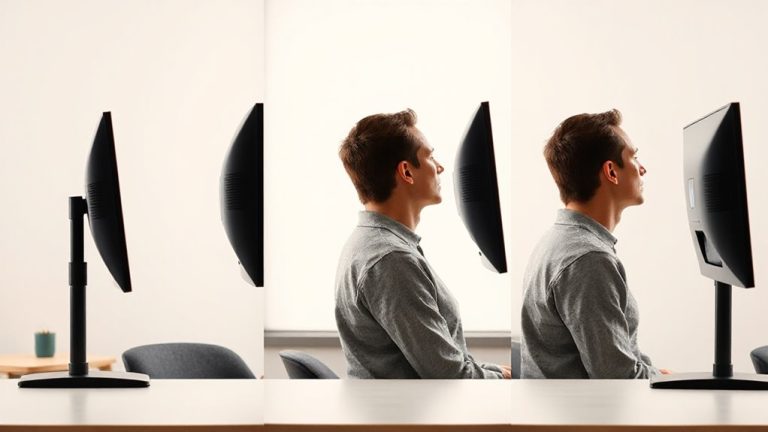
A well-organized workspace makes a real difference in reducing eye strain, especially if you spend hours staring at a screen. Start by adjusting your monitor height so the top is at or just below eye level, about 20–30 inches from your face. Use ergonomic lighting-position a soft, indirect lamp to reduce glare and avoid overhead fluorescents that cause screen reflections. Pair this with blue light filters, either built into your display or via software like f.lux, which adjusts color temperature based on time of day. These filters help, but don’t over-rely on them; they can’t replace proper lighting or correct posture. Choose matte screens over glossy if you’re prone to glare. Small tweaks like cable management and minimizing on-screen clutter also help maintain focus. Results vary, so test changes over a week. Most fixes are low-cost, but effectiveness depends on your habits and environment. Consider adding a best desk lamp to further minimize eye fatigue during prolonged screen use.
On a final note
You should automate screen breaks-they reduce eye strain and boost focus. Built-in tools like Windows Focus Assist or macOS Screen Time work well, but apps like EyeLeo or Time Out offer customizable intervals and exercise prompts. Set reminders every 20 minutes for a 20-second break, aligning with the 20-20-20 rule. Pair alerts with proper ergonomics: position your monitor 20–28 inches away and adjust screen brightness to match ambient light.