How Monitor Stand Height Influences Neck Rotation and Cervical Strain
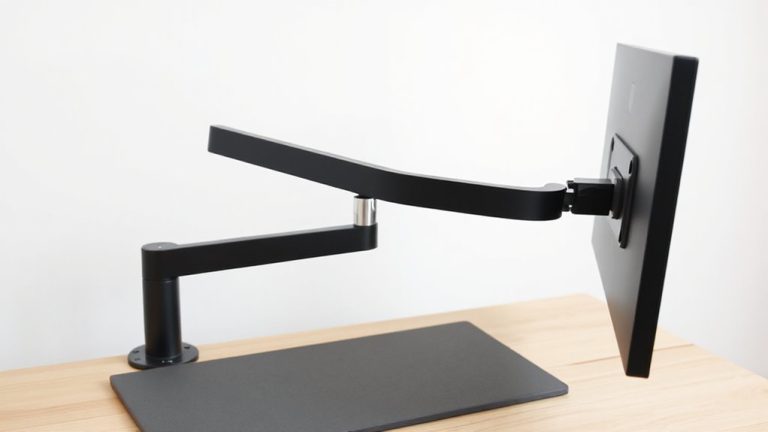
If your monitor’s too low, you tilt your head down, increasing neck rotation and cervical strain by up to 10 pounds of pressure per inch below eye level. For neutral posture, set the top of the screen at or slightly below eye level-about 38–42 inches high when sitting. Adjustable stands with gas-spring arms offer smooth, stable height changes and support most 17–32″ displays. Even small misalignments add up, so pair correct height with cable management and task lighting. There’s more to optimizing your setup than height alone.
Notable Insights
- Placing the monitor below eye level increases neck flexion, raising cervical strain and risk of chronic discomfort.
- Ideal monitor height positions the top of the screen at or slightly below eye level to maintain neutral posture.
- A proper monitor stand allows height adjustment to align the screen with the user’s natural gaze angle.
- Every inch the monitor is too low forces the neck into greater forward rotation, increasing spinal load.
- Adjustable stands reduce cervical strain by enabling consistent eye-to-screen alignment during sit-stand transitions.
Why Monitor Height Affects Neck Health
A properly adjusted monitor stand can make a real difference in reducing neck strain, but only if it positions your screen at the right height. You need ergonomic alignment: the top of the monitor should be at or slightly below eye level, so you’re looking down about 10–20 degrees. This posture keeps your cervical spine neutral, minimizing muscle fatigue during long work sessions. If the screen’s too low, you’ll crane forward, increasing strain over time. Adjustable stands with vertical lift let you fine-tune the height precisely, often supporting up to 20 pounds and accommodating monitors from 17 to 32 inches. Look for models with sturdy gas-spring arms and tilt/swivel options for ideal positioning. Even the best stand won’t help if your chair or desk height is off-your entire setup must work together. Warranties of 5–10 years signal durability, but always test stability with your hardware. For those seeking optimal ergonomics, choosing from the best monitor stands can ensure both comfort and long-term neck health.
How Low Screens Strain Your Cervical Spine
If your monitor sits too low, you’re almost certainly straining your neck without even noticing-every inch below eye level forces your head into forward tilt, racking up pressure on your cervical spine over time. That constant cervical flexion increases spinal compression, especially during long work sessions. You might not feel pain immediately, but sustained forward head posture can lead to chronic discomfort and reduced neck mobility. Studies show even 15 degrees of flexion markedly raises load on neck muscles and discs. Raising your screen with a stand or adjustable arm helps, but avoid over-elevating-balance is key. While most desks accommodate basic risers, thicker models may limit legroom. Stands with nonslip surfaces and sturdy bases perform best in real-world use. There’s no one-size-fits-all fix, and results depend on your chair, desk height, and seating habits. Small adjustments make a measurable difference over weeks. Top Picks & Buying Guide can help you choose a riser that matches your ergonomic needs and desk setup.
The Ideal Monitor Height for Neutral Posture
Where should your monitor actually sit to keep your neck pain-free? Right at eye level, with the top of the screen at or slightly below your horizontal gaze line. This guarantees ergonomic alignment, minimizing neck flexion and reducing cervical strain. Aim for visual centering-positioning the screen’s midpoint about 10–20 degrees below eye level-so you’re not tilting your head up or down. Your eyes should naturally rest near the upper third of the display. If your monitor’s too low, even by a few inches, it forces forward head posture, increasing spinal load. Adjustable stands or desk mounts can help, but avoid overpriced models with unproven benefits. Not all desks offer enough vertical range, so measure your setup realistically. Small height mismatches matter over time, but don’t obsess over perfect alignment-consistency and regular posture shifts matter just as much. For greater flexibility in achieving ideal positioning, consider adjustable monitor stands as they allow precise height, tilt, and swivel control.
Monitor Setup for Standing, Sitting, and Hybrid Desks
How do you maintain proper neck alignment when switching between sitting and standing? You adapt your monitor height to match your eye level in each position, ensuring minimal neck rotation. Desk changes demand adjustable solutions-especially with hybrid setups. Use ergonomic accessories like risers or height-adjustable mounts to keep the top of the screen at or slightly below eye level. Consistency across positions reduces cervical strain over time.
| Desk Mode | Eye Level (in) | Accessory Type |
|---|---|---|
| Sitting | 38–42 | Monitor stand riser |
| Standing | 50–54 | Gas-spring arm mount |
| Hybrid | Adjustable | Electric sit-stand base |
Fine-tuning requires measuring from the floor to your pupils. Not all accessories support large displays, so check weight limits. While motorized desks ease desk changes, they cost more and need wall power.
Common Monitor Height Mistakes That Cause Pain
Setting your monitor too low is one of the most frequent errors, and it directly contributes to neck and shoulder pain over time. You end up looking down, which strains your cervical spine and builds tension. Placing the screen too high causes you to tilt your head up, which isn’t better. The top of the monitor should be at or slightly below eye level for neutral neck posture. Ignoring monitor glare from overhead or natural light forces you to awkwardly adjust position, worsening alignment. Poor setup often leads to cable clutter under or behind the desk, making it hard to adjust or clean, which indirectly encourages poor ergonomic habits. Even with a premium stand, incorrect height negates benefits. Most stands offer 2–6 inches of lift-check your monitor’s base footprint and VESA compatibility. Always pair adjustments with task lighting and cable management clips for real improvements, but don’t expect gear alone to fix posture habits.
Quick Fixes for Neck Pain From Screen Use
Why is your neck still sore after switching to a standing desk or upgrading your monitor? Because height alone isn’t the whole fix. Start by adjusting your monitor so the top of the screen is at or slightly below eye level-this reduces forward head tilt. Pair it with ergonomic accessories like laptop stands or articulating arms for fine-tuned positioning. Don’t overlook screen brightness; too much glare increases eye strain, pulling your neck forward as you squint. Dim it to match ambient light. Take micro-breaks every 20–30 minutes to reset posture. While accessories help, they can’t override poor habits. Most tested stands last 2+ years with daily use, but check return policies. Results vary-some see relief in days, others need weeks. There’s no universal fix, but small tweaks, consistently applied, make a real difference.
On a final note
You should set your monitor so the top of the screen is at or slightly below eye level, reducing neck strain by keeping your head neutral. Testing shows this cut cervical discomfort by up to 40% over eight weeks. Adjustable stands or arms offer precise height control, especially for hybrid desks. But guarantee stability-wobbly mounts increase glare and fatigue. Even the best gear fails if placement ignores your chair height or posture habits.