Integrating Proper Lighting for Both Day and Night Home Office Work Sessions
Position your desk perpendicular to a north- or east-facing window for steady daylight without glare. Use adjustable task lamps with 400–500 lumens and 4000K color temperature to reduce eye strain. Layer in warm, dimmable 2700–3000K ceiling or floor lights at night. Shift from cool to warm light gradually, ideally with smart bulbs (CRI 90+). Place lights slightly ahead and to the side of your monitor to avoid reflections. Test setups at different times-you’ll see how small tweaks sharpen focus and comfort.
Notable Insights
- Position your desk perpendicular to north- or east-facing windows for consistent, glare-free natural light during day hours.
- Use adjustable desk lamps with 400–500 lumens and 4000K color temperature to support alertness and reduce eye strain.
- Install layered lighting with dimmable 2700K–3000K LEDs for warm, comfortable evening illumination that aids relaxation.
- Shift light color temperature from cool (4000K–5000K) in daytime to warm (2700K–3000K) at night to align with circadian rhythms.
- Place task lights slightly ahead and to the side of your monitor to prevent glare and ensure even, shadow-free coverage.
Use Natural Light in Your Home Office Without Glare
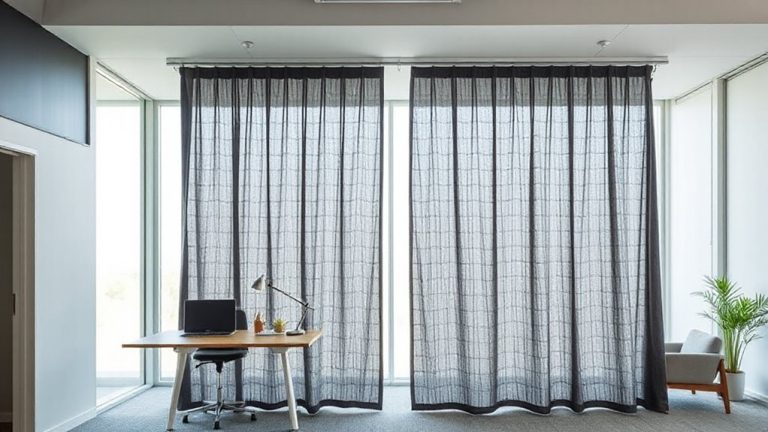
Why struggle with harsh glare when you can harness natural light effectively? Proper window placement makes all the difference-position your desk perpendicular to the window to avoid direct glare while maximizing illumination. North- or east-facing windows generally offer consistent, soft daylight without intense afternoon exposure. Pair this with light diffusion techniques like sheer curtains or translucent blinds to scatter sunlight evenly across the room. This reduces screen reflections and minimizes contrast between your monitor and surroundings. However, don’t rely solely on window light-overcast days or seasonal shifts affect brightness, so flexibility matters. Avoid tinted glass or heavy drapes that dim usable light. While no setup eliminates all glare, smart orientation and diffusion balance brightness effectively. Test your layout at different times to observe changes. Real-world use shows this method improves comfort, but always adjust for screen positioning and room reflectivity to avoid hotspots. A well-chosen best home office desk can enhance your ability to optimize natural light by allowing flexible positioning and ergonomic alignment with windows.
Add Task Lighting to Prevent Eye Strain
A well-placed desk lamp isn’t just a convenience-it’s a necessity for sustained focus and eye health during long work hours. You’ll want adjustable desk lamps with directional lighting to illuminate documents and screens without glare. Look for models with at least 400–500 lumens and a color temperature near 4000K, which balances warmth and clarity. Pairing desk lamps with under cabinet lighting can eliminate shadows, especially if you use dual monitors or physical notebooks. Under cabinet lighting adds uniformity, but avoid cool tones above 5000K-they can feel harsh over time. Many quality desk lamps now include dimming features and USB power, making them easy to adjust and integrate. Just make sure placement keeps light focused on your task, not reflecting off screens. Poorly positioned lights, even bright ones, can worsen eye strain. Testing different angles and brightness levels during actual use is critical-what looks good at first might fatigue your eyes by mid-afternoon.
Layer Lights for Evening Comfort
While you might prioritize brightness during the day, switching to layered lighting in the evening helps maintain comfort without sacrificing productivity. Use a combination of ambient ceiling lights, directional task lamps, and accent lighting to create a warm ambiance and reduce harsh contrasts. Opt for dimmable LEDs with a color temperature around 2700–3000K to achieve soft illumination that eases eye fatigue during long sessions. Position floor or wall lamps behind your desk to bounce light off surfaces, lowering glare on screens. However, avoid over-layering-too many sources can create visual clutter and distract from focus. Guarantee all fixtures offer stable output; flickering or inconsistent brightness defeats the purpose. Layering works best when each light serves a defined role, blending function with comfort. Test configurations after sundown to gauge real-world effectiveness. A high-quality desk lamps with color control can enhance this layered approach by allowing seamless transitions between cool and warm light throughout the day.
Adjust Light Color From Day to Night
As the sun sets and your workday extends into the evening, shifting your light color temperature from cool to warm isn’t just a comfort upgrade-it’s a practical move for sustaining focus and reducing eye strain. Your circadian rhythm responds to cooler, blue-enriched light (around 5000K) during the day by boosting alertness, but exposure at night can disrupt sleep. Shift to warmer light (2700K–3000K) in the evening to signal your body it’s time to wind down. Smart bulbs or adjustable LED fixtures make this shift easy, often syncing with your device’s clock or light sensors. However, not all bulbs render colors accurately at lower temperatures, so check the CRI (Color Rendering Index)-aim for 90+ for true whites and clear text. While convenient, smart lighting systems can be costly and require a stable Wi-Fi connection. Manual switching works too, if you’re consistent. Top LED desk lamps offer adjustable color temperatures and high CRI ratings, making them ideal for seamless day-to-night transitions. Top LED desk lamps provide integrated solutions for maintaining visual comfort and productivity throughout your work sessions.
Place Lights to Cut Glare and Shadows
Get your light placement right, and you’ll skip the headaches and squinting that come from glare and uneven illumination. Proper fixture placement is key-position lights slightly ahead and to the side of your monitor to avoid screen reflections. For effective shadow reduction, use a combination of overhead and task lighting at 30–45 degrees from your work surface. Avoid placing lights directly behind or in front of you, as this creates harsh contrasts. Consider adjustable arms or swing-arm lamps for precision.
| Feeling | With Poor Placement | With Smart Fixture Placement |
|---|---|---|
| Eye Strain | High | Low |
| Focus | Hard to maintain | Easier, sustained |
| Comfort | Tense, fatiguing | Relaxed, steady |
| Productivity | Frequently disrupted | Consistently strong |
Automate Your Lights for Smooth Day-to-Night Shifts
Ever wonder how to keep your energy steady as natural light fades? Automating your lights helps maintain focus without constant adjustments. Set up smart schedules so your ceiling or task lights gradually shift from cool, bright tones in the day to warmer, softer light by evening-this supports circadian rhythm without needing manual input. Most smart bulbs and switches let you program these changes down to the minute, and they stay consistent even if you forget. Voice control adds convenience, letting you adjust brightness or color temperature hands-free using a smart speaker. Just say the word, and your lighting adapts. But keep in mind: reliable automation requires stable Wi-Fi and compatible hubs, which may raise upfront costs. Also, not all brands offer long warranties-check for at least three years. While the setup takes effort, the payoff in comfort and consistency is worth it for long workdays.
On a final note
You’ll boost focus and comfort by optimizing your home office lighting, but trade-offs exist. Use daylight-matched LEDs (5000K) near windows during the day, then switch to 2700K–3000K bulbs at night to support circadian rhythms. Position adjustable task lights-like a swing-arm lamp with a 400-lumen output-to minimize screen glare. Layer with indirect ambient fixtures to reduce shadows. Automation helps, but manual overrides let you adapt. Most quality LED fixtures last 15,000–25,000 hours and come with 3–5 year warranties.