Maximizing Leg Swing Freedom by Evaluating Desk Frame Obstruction Points
You need 25 inches of height and 20 inches of depth under your desk for natural leg movement, but front crossbars and bulky legs often cut into that space, forcing awkward angles and reducing circulation. Open-frame designs with vertical legs and no crossbars give the best clearance-gaining 3–4 inches-though they may sacrifice some stability on wider desktops. Check knee-well width (aim for 27 inches) and avoid flared or inward-angling legs. Removing a crossbar can help, but it might void the warranty or weaken the frame. For most, an adjustable sit-stand base with a streamlined profile strikes the best balance-especially when tested in your actual setup-offering a smart upgrade path worth exploring.
Notable Insights
- Measure knee clearance and under-desk depth to ensure at least 27 inches height and 20 inches depth for unrestricted leg swing.
- Identify obstruction points by sitting normally and marking areas where legs contact frame components like crossbars or legs.
- Avoid front crossbars that reduce footwell space and force inward leg angling, limiting natural movement.
- Choose vertical, streamlined desk legs to maximize knee-well width and minimize interference with leg swing.
- Opt for open-frame designs that enhance legroom and support active sitting without sacrificing structural integrity.
Why Leg Swing Space Matters for Sitting Comfort
While you might not think twice about how much room you have to move your legs while sitting, having enough leg swing space is essential for staying comfortable during long work sessions. Restricted movement compromises your ergonomic health and forces your muscles to stay tense, increasing muscle fatigue over time. With proper clearance beneath your desk-ideally 25 inches high and at least 20 inches deep-you can shift positions, sway slightly, or stretch your legs forward without hitting frame obstructions. This small freedom reduces strain on your lower back and thighs. Still, taller desks may reduce headroom if ceiling height is under 8 feet. Adjustable sit-stand bases help, but verify stroke length and weight capacity. Even with ideal clearance, poor chair design can undo benefits. Prioritize open frames without front crossbars-those come later. Real comfort blends precise measurements with everyday flexibility. Models like the best adjustable desks offer optimized clearance and sturdy, open-frame designs ideal for maximizing leg swing freedom.
The Hidden Problem With Front Crossbars
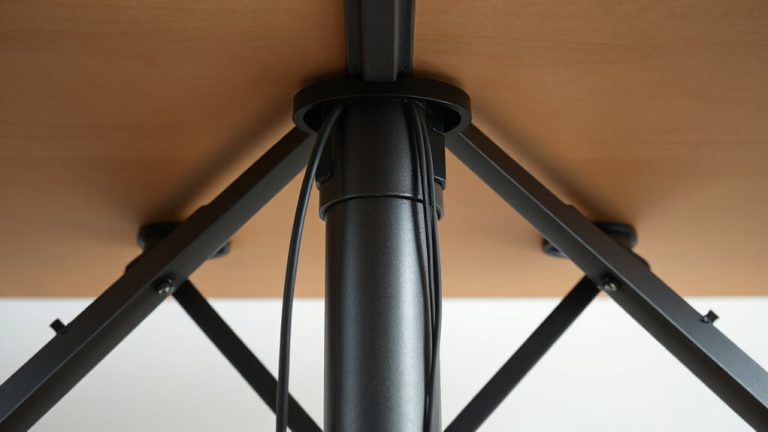
Why does something as small as a front crossbar make such a big difference in comfort? Because it directly cuts into your footwell pressure zone and reduces knee clearance when you stretch or shift forward. Even a slim 1.5-inch steel bar can force your legs to angle inward, increasing fatigue over time. Models without front crossbars, like the Uplift V2 or Fully Jarvis, offer deeper leg swing access-often adding 3–4 inches of usable space. That extra room lets you change posture naturally, which studies link to lower back and leg strain. But here’s the caveat: removing the crossbar can reduce frame rigidity, especially on wider desktops over 60 inches. Always check the warranty-some brands void it if you modify the frame. For most users under 6 feet, the trade-off favors open space, but taller users may need that front support to prevent wobble. Test stability before deciding.
How Desk Leg Shape Blocks Your Movement
Ever notice how some standing desks feel cramped, even with no crossbar? That’s often due to leg shape. Bulky or wide-profile legs take up valuable under-desk space, creating movement restriction just where you need it most. Even sleek-looking frames might angle inward or flare at the base, limiting your leg swing and forcing you into a fixed position. This becomes especially noticeable during long work sessions or active sitting. Models with streamlined, vertical leg designs typically offer better clearance and reduce obstructions. However, don’t assume slimmer is always sturdier-some narrow legs sacrifice stability, especially on larger desktops. Always check the leg taper and minimum knee-well width; 24 inches is a solid baseline for comfortable leg movement. Real-world testing shows that a well-shaped leg can increase usable space by up to 15%, but always balance form with frame load ratings and warranty length to guarantee long-term reliability.
Open vs. Closed Frames: Which Gives More Legroom?
An open-frame desk typically gives you more legroom than a closed design, especially if you move often or prefer active sitting. Its minimalist structure removes panels and cabinets, letting your legs swing freely front and side. This makes it a stronger fit for ergonomic design, as unrestricted movement supports better circulation and posture. Closed frames limit motion with solid sides or shelves, but they offer more storage. Still, that added convenience comes at the cost of leg clearance and material flexibility-thicker wood or metal in closed bases can’t adapt to shifting positions. Open frames often use lightweight steel or aluminum, balancing strength and agility. While they suit dynamic workstyles, they may feel less sturdy under heavy daily use. Some models address this with reinforced joints and 5-year warranties. For maximum freedom, pick open-frame desks with wide footprints and low crossbars-just verify build quality first. A top pick for achieving this balance is the Best Home Office Desks list, which highlights models emphasizing both mobility and durability.
How to Measure Your Desk’s Obstruction Points
Where exactly is your desk cutting off movement? Start by sitting in your usual position and swinging your legs naturally. Note where resistance occurs. Measure the knee clearance from the floor to the lowest obstruction beneath the desk-ideally, you need at least 27 inches for comfortable leg swing. Use a tape measure to check depth, too; less than 20 inches could cause toe bumping when leaning forward. Check side-to-side frame bars or crossbeams, as they limit lateral motion. Mark each obstruction point with tape, then map them. Even well-designed desks with closed frames often restrict more than they should. While open frames usually improve clearance, some still place support rods too far forward. Don’t assume design equals function-test it yourself. These measurements matter, especially if you’re taller or move frequently. Your comfort hinges on real dimensions, not marketing.
Simple Fixes (or When to Ditch Your Desk)
How much are you really gaining from that bulkhead frame under your desk? If it’s restricting leg swing, not much. Before replacing your desk, try simple fixes: adjust desk height to create clearance, especially if you’re shorter or use a kneeling chair. Redirect cable clutter with adhesive clips or under-desk trays-tangled wires often mimic structural obstructions. But if the frame’s footprint eats more than 6 inches of legroom, keep reading.
| Fix | Worth It? |
|---|---|
| Re-routing cable clutter | Yes, always |
| Adjusting desk height | Sometimes |
| Replacing desk | Only if clearance < 5" |
Some desks simply can’t accommodate leg swing, no matter the tweaks. If adjustments fail and discomfort persists, ditch the desk-especially if it lacks height adjustability or a clean cable path. Warranties won’t matter if your body pays the price. Upgrading to one of the best standing desks can significantly improve ergonomics and legroom without sacrificing stability.
On a final note
You’ll get the most leg swing freedom with an open-frame desk that lacks front crossbars and has narrow, vertical legs. These designs clear your thighs and let you shift positions comfortably. But confirm legroom depth-some open frames still cut into knee space. Check for at least 24 inches of unobstructed depth and smooth leg edges. Sturdy steel frames last, but test wobble; some prioritize openness over stability.